
Most eCommerce operational problems trace back to one source — asynchronous data across systems. Your online store shows product availability based on yesterday's inventory count. Your CRM doesn't reflect the customer's most recent purchase. Your shipping system lacks real-time order prioritization.
These time lags and data discrepancies compound as your business scales, creating what operations experts call "coordination friction" — the hidden tax of managing disconnected systems.
eCommerce integration eliminates this friction through API-driven data synchronization. When architectured properly, it provides real-time operational coherence across your entire business infrastructure.
Let's explore how to build this capability. We'll cover what eCommerce integration actually involves, why it's become non-negotiable for competitive operations, the different integration types your business needs, common implementation challenges and how to avoid them, and a practical framework for choosing and deploying integration solutions that match your technical resources and growth trajectory.
What Is eCommerce Integration?
ECommerce integration is the process of connecting your online store with other business systems so data flows between them automatically. Think of it as creating a network where your shopping cart, inventory management, accounting software, and shipping tools all speak the same language.
The main goal? Automation of data exchange between systems.
When someone places an order on your website, that information needs to go to your warehouse, update your inventory, trigger a shipping label, record the sale in your accounting system, and maybe add the customer to your email marketing list. Without integration, you're doing all that manually. With integration, it happens in seconds.
But it's not just about moving data around. Real eCommerce data integration ensures that information is accurate, timely, and formatted correctly for each platform it touches.
How does It work?
Most eCommerce integrations rely on APIs (Application Programming Interfaces).
When a customer completes a purchase, your eCommerce platform sends that order information through an API to your other systems. Those systems receive the data, process it according to their own rules, and send back any necessary information (like tracking numbers or inventory updates).
Some integrations use middleware — software that sits between your applications and translates data from one format to another. The method matters less than the result: your systems are working together without you having to lift a finger.
Why eCommerce Integration Matters for Businesses
Let’s be honest: integration isn't going to wow your customers the way a beautiful website redesign might. But it's the backbone of efficient online operations.
Manual data entry introduces errors. Period. Someone types "100" instead of "10" for an inventory count, and suddenly you're selling products you don't have.
According to IBM's research, poor data quality costs businesses an average of $12.9 million annually. That's not a small problem.
Integration eliminates most of these errors by ensuring data moves directly from one system to another without human intervention. Your inventory numbers stay accurate. Customer information stays correct. Order details don't get garbled.
You probably didn't start your business to spend hours copying data between spreadsheets. But that's where many entrepreneurs end up without proper integration.
Think about how long it takes to manually process an order: check details, update inventory, create shipping labels, send confirmations, record sales, update customer records. Maybe 10 minutes per order? If you're processing 50 orders a day, that's over 8 hours of pure data entry. With integration, that same process happens automatically in seconds.
And here's the kicker: as your business grows, manual processes don't scale. Integration scales infinitely.
Your customers don't care about your backend systems. They just want their orders to arrive on time with accurate tracking information.
When your systems are integrated, customers get instant order confirmations, real-time inventory availability, accurate shipping updates, and faster support responses.
One client told me they reduced customer service inquiries by 40% just by integrating eCommerce systems with their help desk software. Support agents could see order status instantly instead of searching through multiple systems.
Types of eCommerce Integrations
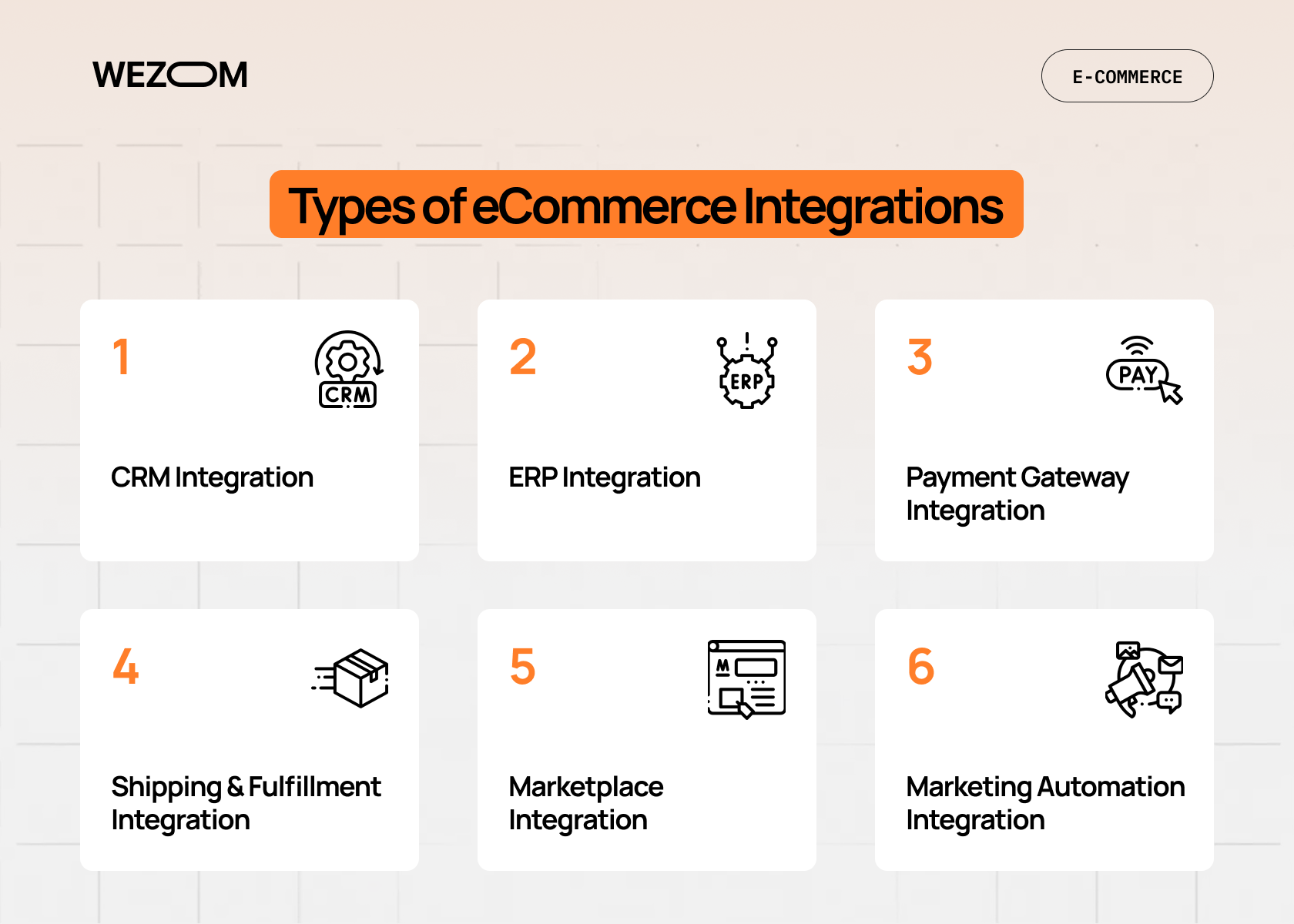
Not all integrations are created equal. Different business needs require different types of connections.
CRM Integration
CRM integration with eCommerce platforms connects your customer relationship management system with your online store. Every purchase, every interaction, every support ticket lives in one place.
Why does this matter? Because knowing your customer history is powerful. When someone contacts support, your team can see their entire purchase history. When you're planning a marketing campaign, you can segment based on actual buying behavior.
Salesforce, HubSpot, and Zoho are popular CRMs that integrate well with most eCommerce platforms.
ERP Integration
eCommerce ERP integration connects your online store with your enterprise resource planning system. This is where things get interesting for growing businesses.
Your ERP handles the serious backend stuff: inventory across multiple warehouses, supply chain management, financial reporting, production planning. When it's integrated with your eCommerce platform, you get a single source of truth for your entire operation.
SAP, Oracle, and Microsoft Dynamics are the big players here. But honestly? ERP integration can be complex. You might need professional help to get it right.
Payment Gateway Integration
This one's non-negotiable. Your online store needs to accept payments, and that means integrating with payment processors like Stripe, PayPal, or Square.
Good payment integration does more than just process transactions. It handles fraud detection, manages payment failures, supports multiple currencies, and ensures PCI compliance.
Shipping & Fulfillment Integration
Getting products to customers requires coordination between your store, warehouse, and shipping carriers. Fulfillment integration automates this entire workflow.
When an order comes in, your integrated system can check inventory across locations, route the order optimally, generate shipping labels automatically, send tracking numbers, and update inventory counts in real-time.
ShipStation, ShipBob, and direct carrier integrations make this possible. The result? Orders ship faster and with fewer errors.
Marketplace Integration
Selling on Amazon, eBay, Etsy, or other marketplaces? You need marketplace integration to manage inventory and orders across all channels without going insane.
Without integration, you risk overselling. With it, your inventory stays synchronized across every channel in real-time.
Marketing Automation Integration
Email campaigns, abandoned cart recovery, customer segmentation, all of this works better when your marketing tools are integrated with your eCommerce platform.
Mailchimp, Klaviyo, and similar tools can trigger automated campaigns based on customer behavior. Someone abandons their cart? They get a recovery email. These triggers happen automatically based on actual sales data from your store.
Challenges in Integrating eCommerce Systems
Let's talk about what can go wrong. Because it's not all smooth sailing.
APIs are powerful, but they're not always user-friendly. Different systems use different API standards. Some require complex authentication. Others have rate limits that restrict how much data you can transfer.
Maybe you're trying to connect a modern cloud-based eCommerce platform with a legacy accounting system from 2010. Good luck making those two speak the same language without middleware or custom development.
You're moving sensitive information (customer data, financial records, inventory details) between systems. If any link in that chain has security vulnerabilities, you've got a problem.
According to recent statistics, cybercrime is expected to cost businesses worldwide $10.5 trillion annually by 2025. eCommerce integration needs to prioritize encryption, secure authentication, and compliance with regulations like GDPR and PCI DSS.
An integration that works fine for 100 orders a day might break down at 1,000 orders. Your systems need to handle increased data volume without slowing down.
This is where scalability becomes critical. Choose integration solutions that can grow with your business.
We've seen businesses make the same mistakes repeatedly, here are the common ones and how to avoid them:
- Trying to integrate everything at once. Start with your most critical connections and build from there.
- Ignoring data mapping. Just because two systems can connect doesn't mean their data fields align perfectly.
- Forgetting about maintenance. APIs change. Software updates. Your integrations need ongoing monitoring and optimization.
- Choosing the cheapest option without considering long-term costs. A poorly implemented integration will cost you more in the long run.
Best eCommerce Integrations and Software Solutions
So what are your options? Here's a quick rundown of popular solutions.
| Solution | Best For | Key Features |
|---|---|---|
| Zapier | Small businesses, simple integrations. | No-code automation, thousands of app connections, easy setup. |
| MuleSoft | Enterprise companies. | Robust API management, complex data transformations, high scalability. |
| Celigo | Mid to large businesses. | Pre-built integrations, iPaaS platform, NetSuite specialization. |
| Jitterbit | Growing businesses. | Hybrid integration, API creation, real-time data sync. |
| Dell Boomi | Enterprise operations. | Cloud-native, extensive connector library, master data management. |
| Workato | Teams needing automation. | AI-powered recipes, enterprise app integration, workflow automation. |
Each of these platforms has strengths and weaknesses. The "best eCommerce integrations" depend entirely on your specific needs, budget, and technical resources.
How to Choose the Best eCommerce Integration Software
Okay, so what is the best eCommerce integration software for your business? Honestly, there's no universal answer. But here are the criteria that matter:
- Compatibility. Does it work with your existing systems? Check the connector library. Make sure your eCommerce platform, ERP, CRM, and other essential tools are supported.
- Scalability. Can it handle your growth? You might be processing 1,000 transactions monthly now, but what about when you hit 10,000? Or 100,000? Look for solutions that offer tiered pricing based on volume and can scale without requiring a complete reimplementation.
- API Support and customization. Even with pre-built connectors, you'll probably need some customization. Can the platform handle custom API calls? Does it support webhooks for real-time updates? The more flexible the API support, the more you can tailor integrations to your specific workflow.
- Security and compliance. Your integration solution needs enterprise-grade security: encryption in transit and at rest, role-based access control, audit logs, and compliance certifications relevant to your industry.
- User experience. If your team can't figure out how to use the integration tool, it doesn't matter how powerful it is. Look for intuitive interfaces, good documentation, and responsive support.
And some tips for different business sizes:
Small businesses: start with affordable, no-code solutions like Zapier or native integrations built into your eCommerce platform.
Growing businesses: consider platforms like Celigo or Jitterbit that offer more power without requiring a full IT department.
Enterprise companies: you probably need custom integration development or robust iPaaS solutions like MuleSoft or Dell Boomi.
When custom integration makes sense?
Sometimes off-the-shelf solutions won't cut it. You might need custom development if your systems are highly specialized, you have unique business processes that standard integrations can't handle, or you're working with legacy systems without modern APIs.
Custom integration costs more upfront but gives you exactly what you need. Weirdly enough, it can be more cost-effective long-term than forcing a standard solution to do something it wasn't designed for.
Steps to Successfully Integrate eCommerce Systems
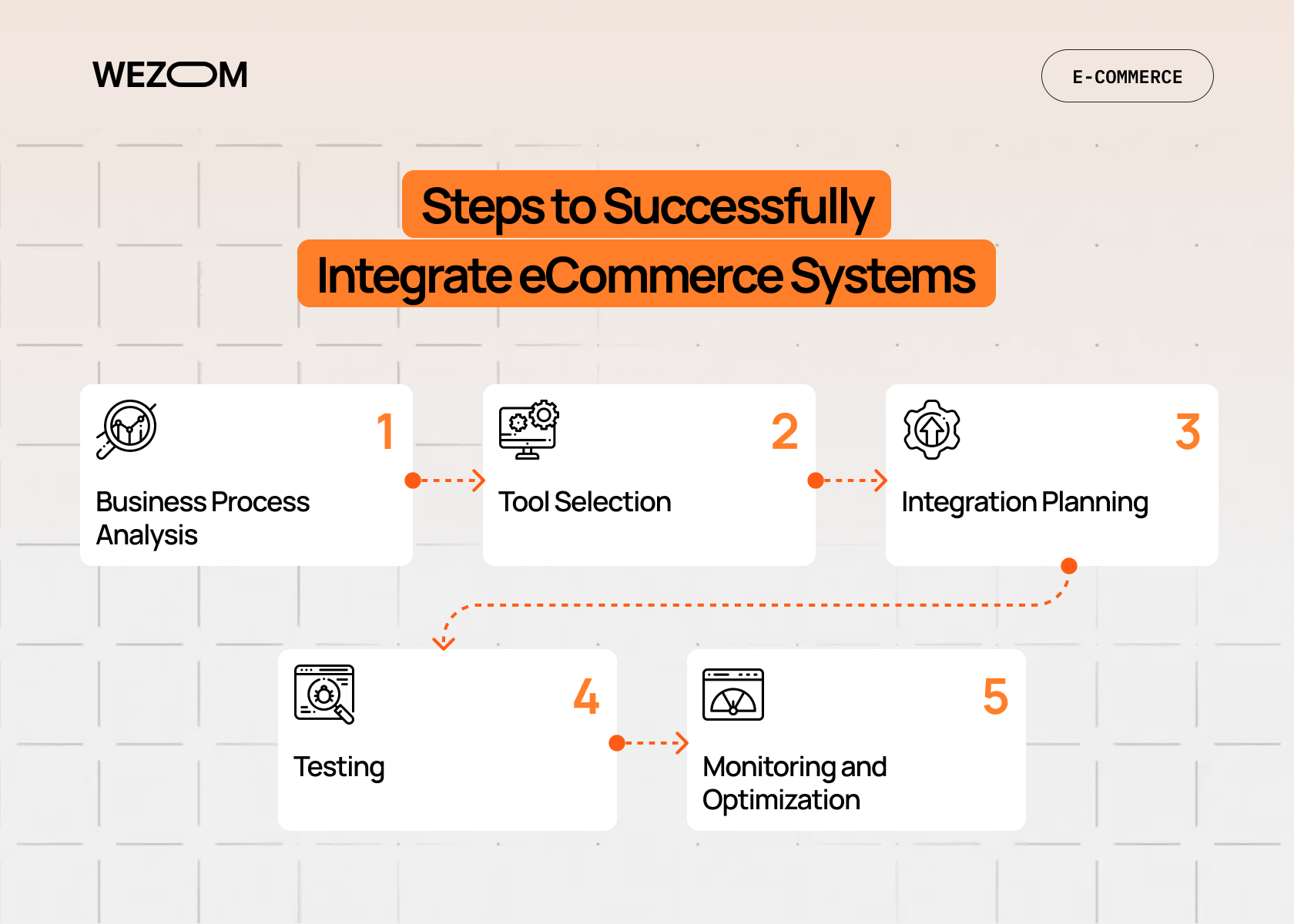
Alright, you're convinced integration is necessary. How do you actually make it happen?
1. Business Process Analysis
Before you integrate anything, understand your current processes. Map out how data flows through your organization now. Where are the bottlenecks? Where do errors occur most frequently?
Talk to the people who actually do the work. Your warehouse manager knows where fulfillment breaks down. Your customer service team knows which information they're always hunting for.
2. Tool Selection
Based on your process analysis and the criteria we discussed earlier, choose your integration tools. Don't just go with what's most popular, go with what fits your specific needs.
Request demos. Talk to other businesses in your industry. Read actual user reviews.
3. Integration Planning
This is where you get into the details: which systems will connect to which, what data needs to flow between them, how often synchronization should occur (real-time, hourly, daily), and what happens when something goes wrong?
A solid integration plan saves you from nasty surprises during implementation.
4. Testing
Test everything. Then test it again.
Start with a staging environment that mirrors your production setup. Run test transactions through the entire workflow. Try to break things.
Common testing scenarios: high volume loads, duplicate data, missing or malformed data, network interruptions, system timeouts.
You want to discover problems in testing, not when a real customer's order is on the line.
5. Monitoring and Optimization
Integration isn't a set-it-and-forget-it thing. You need ongoing monitoring to catch issues before they impact your business.
Set up alerts for integration failures, data sync errors, and performance degradation. Review logs regularly. Track key metrics like sync success rates and processing times.
And here's something people often miss: integrations need optimization over time. As your business changes, your integration needs might change too.
Real-World Impact of eCommerce Integration
That quote captures it perfectly. When you're not drowning in manual data entry and firefighting errors, you can actually focus on growing your business.
Consider this: a typical mid-sized online retailer might save 20-30 hours per week through proper integration. That's nearly a full-time employee's worth of productivity. Not to mention the reduction in costly errors and improvement in customer satisfaction.
Conclusion
So what is eCommerce integration? It's the connective tissue that holds your digital business together. It's automation that frees your team from tedious manual work. It's accuracy that keeps customers happy and costs down. It's scalability that lets you grow without hitting operational walls.
Is it complex? Sometimes. Is it necessary? Absolutely.
If you're still manually updating inventory across multiple channels or re-entering order information into different systems, you're not just wasting time, you're limiting your growth potential. Modern eCommerce is too competitive and moves too fast for manual processes to keep up.
Start small if you need to. Connect your eCommerce platform with your accounting software. Add shipping integration next. Build from there. But start.
Not sure where to begin or which approach makes sense for your specific setup? That's exactly what integration consultants and development teams are for — to assess your current systems, recommend the right solutions, and handle the technical heavy lifting while you focus on running your business. Contact us, we’ll be happy to help.

FAQ
How does eCommerce integration improve business operations?
eCommerce integration automates data transfer between your online store and other business systems, eliminating manual entry and reducing errors. It improves operations by ensuring real-time inventory accuracy, faster order processing, better customer data management, and more efficient workflows. You'll save time on repetitive tasks and can scale your business without proportionally increasing administrative overhead.
What is the best eCommerce integration software?
There's no single "best" solution, it depends on your business size, technical resources, and specific needs. Small businesses often do well with Zapier or built-in platform integrations. Growing businesses might consider Celigo or Jitterbit. Enterprise companies typically need MuleSoft, Dell Boomi, or custom solutions. Focus on compatibility with your existing systems, scalability, and support quality.
How long does it take to integrate eCommerce systems?
Simple integrations using pre-built connectors can be set up in a few hours or days. More complex integrations involving multiple systems, custom data mapping, or legacy applications might take weeks or even months. The timeline depends on how many systems you're connecting, the complexity of your data structures, and whether you need custom development. Plan for adequate testing time.
How much does eCommerce integration typically cost?
Costs vary dramatically based on your approach. Basic tools like Zapier start around $20–$300 per month. Mid-market iPaaS solutions typically range from $500–$3,000 monthly. Enterprise platforms can cost $10,000+ monthly. Custom integration development might require $10,000–$100,000+ in initial investment. Factor in ongoing maintenance costs and potential consulting fees.
Is eCommerce integration secure?
When implemented properly with reputable tools, yes. Modern integration platforms use encryption, secure authentication protocols, and compliance certifications (like SOC 2, GDPR, PCI DSS) to protect data. However, security requires ongoing attention: regular updates, monitoring, access controls, and proper configuration. Always prioritize security in your integration planning and work with vendors who take it seriously.
