
A provider running two warehouses, eleven clients, and a few hundred orders a day carries the same structural problems as a national fulfillment network: inventory owned by different clients, per-client billing rules, and several sales channels feeding one pick line. What it lacks is an IT department, a six-figure budget, and patience for a nine-month implementation. Choosing 3pl software for small business operations comes down to which of those problems software must solve now, which can stay manual another year, and which pricing model becomes the constraint once volume grows.
What Small Businesses Actually Need From 3PL Software
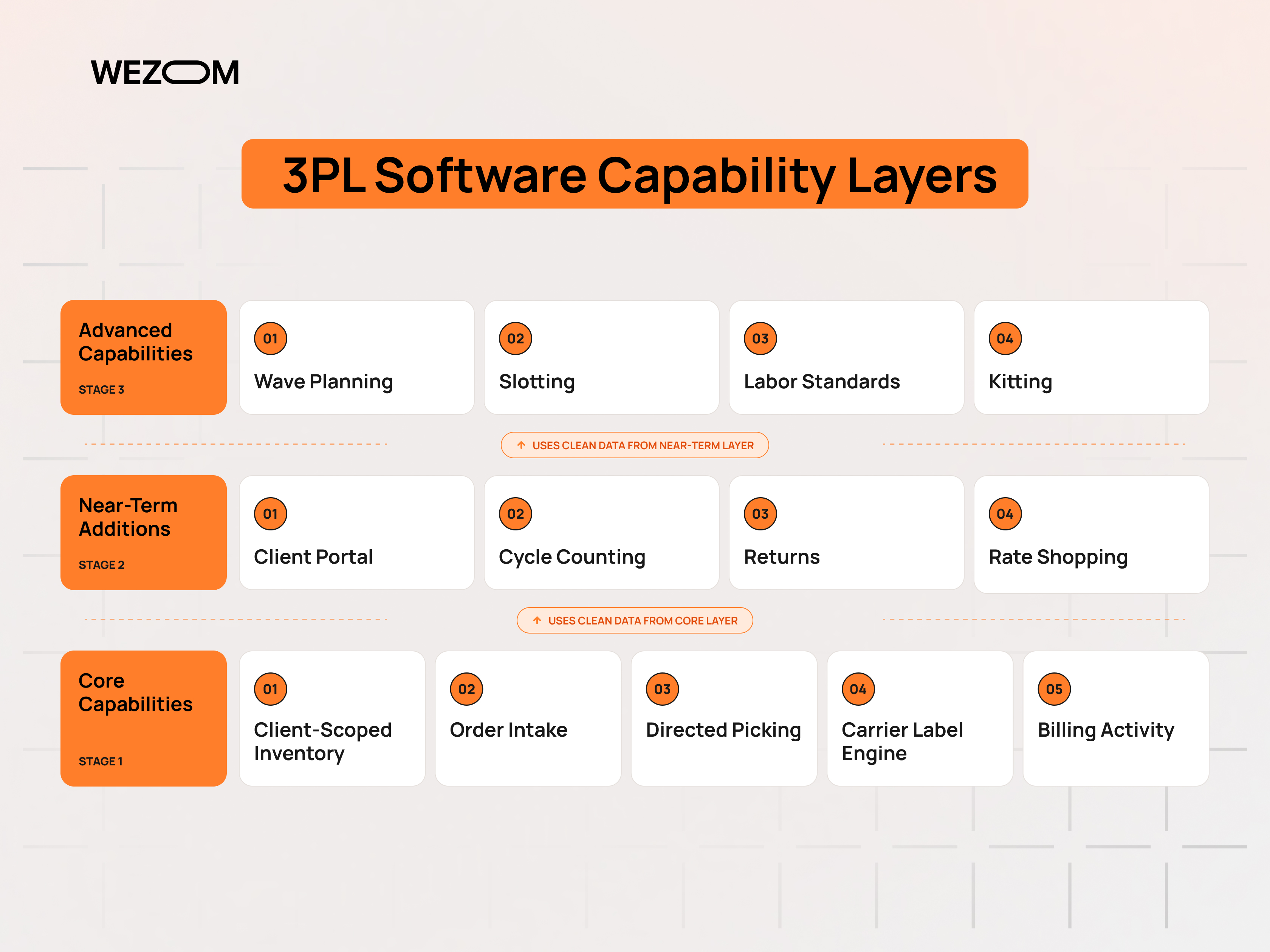
Enterprise feature lists describe capabilities built for operations with dedicated administrators. A small provider needs a narrower set, chosen against its own order profile.
The Minimum Viable 3PL Software Stack for a Small Operation
The functional floor is lower than most demos suggest, but none of it is optional: inventory tracked by client, SKU, and location; orders arriving from client channels without re-keying; a directed pick task with scan confirmation; carrier labels with tracking returned to the originating channel; and a record of every storage and handling event tied to the client that generated it.
Inventory Accuracy, Order Visibility, and Warehouse Control
Accuracy here is stricter than a correct total count, because stock belongs to different owners and a unit in the wrong ownership bucket is a billing error and a fulfillment error at once. Location-level control preserves that separation through bin assignments, lot and expiry attributes where the product requires them, and a movement history explaining how a quantity changed. Order visibility rests on the same records.
Multi-Client Management Without Enterprise-Level Complexity
Multi-client inventory separates 3pl warehouse management software from general inventory tools: client-scoped data, client-specific receiving and shipping rules, and reporting that never blends one account's numbers into another's. A platform that models fifteen clients cleanly and is reconfigurable by a warehouse manager beats one that needs a consultant for every change.
Essential Features vs Features You Can Add Later
Directed picking, scan confirmation, channel order intake, carrier labels, and activity-based billing belong in the first release. Cycle counting programs, wave planning, slotting, labor standards, kitting, and returns automation can wait for volume or a specific contract. Vendors build pricing tiers around the advanced modules, so buying wave planning at fifty orders a day funds capability that sits idle.
Core 3PL Software Features Worth Paying For
Each feature below either removes a manual step that scales with order volume or prevents an error class that costs more to correct than to avoid.
Multi-Warehouse and Multi-Client Inventory Management
Once a second facility opens, inventory becomes a routing question rather than a counting question. The platform needs on-hand, allocated, and available quantities per client per site, a consolidated view of what exists across the network, and transfers that carry ownership and cost attributes with the goods.
Receiving, Putaway, Picking, Packing, and Shipping Workflows
Receiving should validate an inbound against an expected ASN or purchase order and capture discrepancies at the dock rather than at month-end. Putaway records the destination at the moment of the move, whether the system directs the operator or the operator chooses the location. Directed picking sequences tasks by location, batches orders where the profile allows, and confirms each pick by scan. Packing verifies contents and captures cartonization data that shipping needs for rating, and it is the usual weak link, where operations revert to visual checks and lose the audit trail that supports client claims.
Barcode Scanning, Labels, and Mobile Warehouse Operations
Scanning turns inventory accuracy from a discipline problem into a system property, since every receipt, move, pick, and pack produces a timestamped record tied to an operator and a location. Thermal print quality matters, because unreadable bin, carton, or carrier labels reintroduce keyboard entry. Browser-based mobile screens run on inexpensive Android devices, while native applications with offline queuing survive patchy warehouse Wi-Fi.
Order Management and Real-Time Inventory Tracking
Orders arrive by channel connector, API, EDI, or file drop, and the platform normalizes them into one queue, applies allocation rules, and holds failed records in an exception state instead of pushing them into picking. Real-time inventory tracking keeps a client's storefront from overselling, because available quantity changes the moment an allocation or pick occurs.
Client Portals and Customer-Level Inventory Visibility
A portal is the cheapest support automation a small provider can deploy. Read access to a client's own inventory, order statuses, receipts, and tracking removes a recurring email load and shortens the sales cycle, since prospects treat visible data as evidence of operational control.
3PL Billing, Storage Fees, Handling Charges, and Invoicing
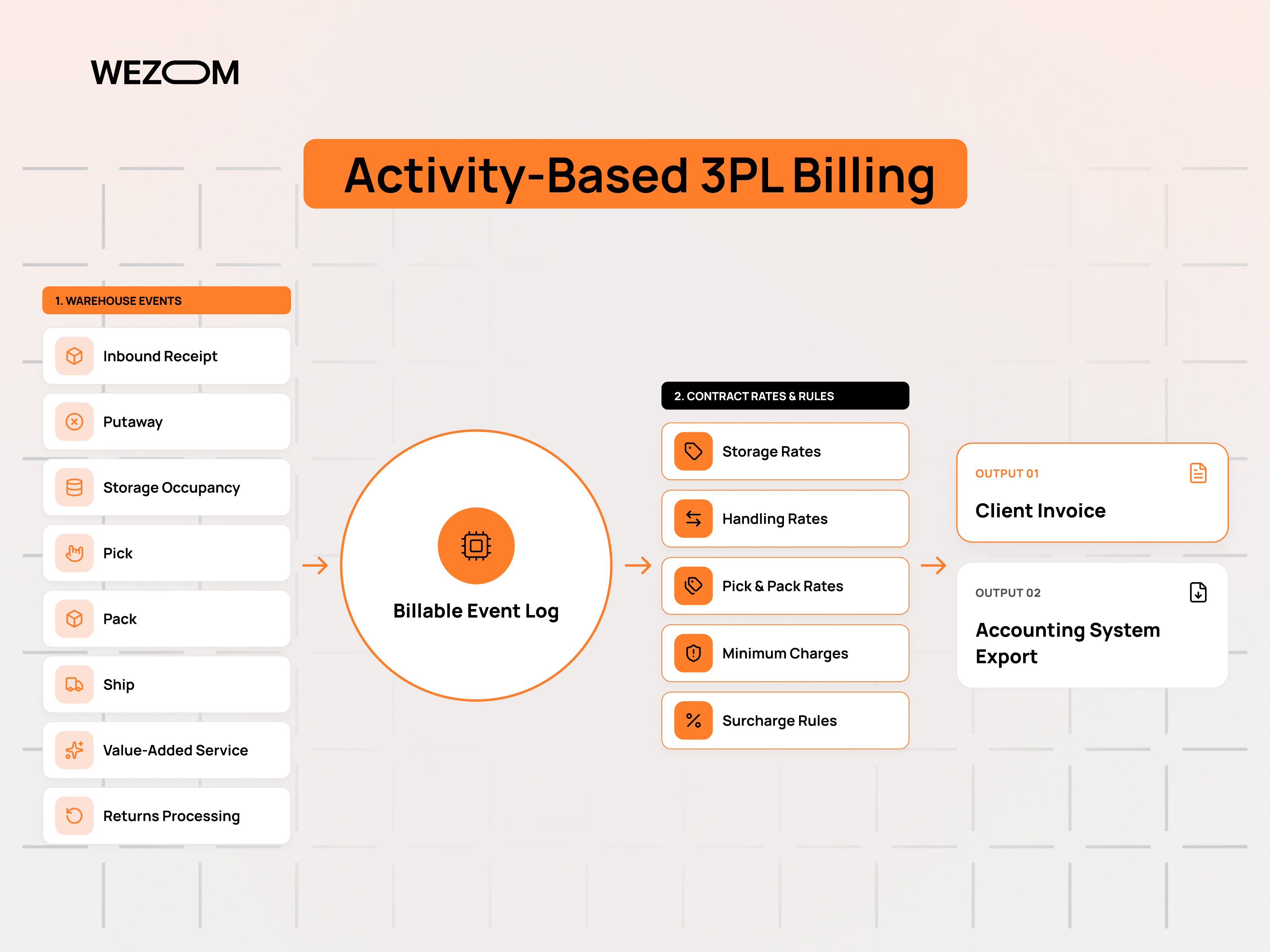
Billing is the most underestimated feature and the one that most reliably justifies paid 3pl fulfillment software. Warehouse revenue is assembled from events: storage per pallet, bin, or cubic foot over a period, receiving and handling per pallet, carton, or unit, pick and pack per order plus per line, then value-added work, account minimums, and carrier cost recovery. Software that captures each billable event as it occurs and applies a client rate card produces invoices from operational data rather than someone's reconstruction of the month.
Reporting, Dashboards, and Inventory Analytics
Operations needs a short daily set: orders received against orders shipped, open exceptions, late orders, receipts pending putaway, and inventory adjustments. Clients need periodic accuracy, throughput, and inventory aging figures. Behind both sits data access: modest reports with a documented API support any analysis the business needs, while dashboards without an export path limit it to the vendor's questions.
3PL Software SaaS: When a Cloud Platform Makes Sense
Subscription platforms dominate this market because they convert a capital project into an operating expense. The trade suits most small providers, and it has a specific expiry point.
How SaaS 3PL Software Works for Small Warehouses
The vendor operates one multi-tenant application and gives each customer an isolated data set within it. Configuration replaces development: client records, rate cards, locations, users, and channel connections are set up through an interface, and the warehouse runs on a shared codebase.
Subscription Pricing vs Upfront Development Costs
Subscription pricing usually combines a platform fee with variables such as order volume, user seats, connected channels, or warehouse count. The honest comparison is total cost of ownership across the years the system will actually be used. A subscription holds hosting, updates, and support inside one line item, while a built system pushes those costs into an internal budget where they are easy to defer.
Automatic Updates, Hosting, Backups, and Technical Support
Most of the value sits in work the buyer never sees: patched dependencies, tested releases, monitored infrastructure, and restorable backups. Support quality varies more than feature sets do, so the useful questions concern response commitments during a shipping cutoff, escalation paths for a stuck integration, and documented recovery objectives.
Where SaaS Platforms Become Restrictive as a 3PL Grows
Constraints appear at the edges of the vendor's data model. A client wanting a nonstandard billing rule, an unsupported receiving workflow, or a document format outside the standard set forces a manual workaround or a change request the vendor may decline. Volume-based pricing can also outpace margin, since software cost rises with transactions while the fee charged per order tends to fall as clients grow.
Cloud-Based 3PL Software for Teams Without In-House IT
For a provider with no systems administrator, cloud-based 3PL software removes server provisioning, patching, database tuning, and disaster recovery testing, leaving user administration, integration configuration, and data hygiene that a capable operations manager can handle. That staffing reality settles the deployment question for most small 3pl warehouse software buyers well before any feature comparison does.
3PL Software Open Source: More Control, but Is It Really Cheaper?
Open-source deployment answers a different question. It is not primarily a cost decision but a decision about control over the data model, the workflow logic, and the exit path.
What Open-Source 3PL and Warehouse Management Software Provides
Projects such as Odoo, ERPNext, Apache OFBiz, and OpenBoxes offer inventory, receiving, picking, and shipping capability under licenses permitting modification and self-hosting. None ships as a purpose-built 3PL product, so multi-client structures, per-client rate cards, and activity-based billing become development work layered on top. Open-source warehouse management software supplies a foundation and a permissive license, not a finished 3PL platform.
Self-Hosted WMS, Source Code Access, and Custom Workflows
Source access matters when a client contract requires behavior no vendor will build. A self-hosted WMS can enforce a specific allocation rule, expose a data structure another system needs, or add a billing dimension the business invented, without waiting on a roadmap, and the data stays in a database the provider controls.
Hosting, Development, Security, and Maintenance Requirements
The obligations transfer with the control. Someone has to run servers or managed cloud services, patch on schedule, manage backups and test restores, and handle upgrades that may break customizations.
Vendor Lock-In vs the Technical Burden of Self-Hosting
Both models concentrate risk. SaaS concentrates it in a vendor relationship: pricing changes, roadmap decisions, acquisition, and the difficulty of extracting historical data in a usable structure. Self-hosting concentrates it in the few people who understand the deployment, and one developer leaving can be a sharper dependency than a replaceable subscription.
When Open-Source 3PL Software Is a Good Fit for a Small Business
The fit is strongest where technical capacity already exists, where a contract demands workflow or data behavior commercial platforms do not support, or where an in-house team already runs the same framework elsewhere. It is weakest where the operations team is the whole team, or where the motivation is simply avoiding a subscription fee.
3PL Software Free: What You Can Actually Get for $0
Free options fall into categories that behave very differently once real volume arrives, and confusing them is a common budgeting mistake.
Free 3PL Software vs Freemium Plans vs Free Trials
A free trial is full functionality for a fixed period, an evaluation tool rather than a plan. A freemium tier is a permanent commercial plan with capped usage, designed so that growth triggers an upgrade. Genuinely free software is open-source code with no license fee, where cost shifts to hosting and engineering instead of disappearing, and only that third category is durably free.
Transaction, User, Warehouse, and Feature Limits
Caps sit on the dimensions that correlate with revenue: monthly orders, active SKUs, user accounts, connected channels, warehouse locations, and API call volume. User seats and warehouse count bind first for a 3PL, and the withheld features are commonly the core ones, including client portals, per-client billing, and integration access.
Can Free Warehouse Management Software Handle Real 3PL Operations?
Free warehouse management software can run a small single-client operation competently, and often does. It breaks down on multi-client separation, because most free inventory tools model one owner of stock. The provider then either creates parallel accounts per client and loses consolidated visibility, or tags ownership in a custom field and rebuilds the separation by hand in reports and invoices.
Hidden Costs: Setup, Hosting, Integrations, Training, and Support
Setup work such as location schemes, SKU normalization, and rate card entry consumes staff hours regardless of license fee. Self-hosted deployments add infrastructure and administration; channel or carrier connections may require paid middleware, and free support usually means a community forum with no response commitment during peak week.
When Free Software Costs More Than a Paid 3PL Platform
A weekly cycle of manual invoicing, spreadsheet reconciliation, and channel updates consumes labor hours that can be priced directly, and errors caused by missing scan confirmation carry correction costs and client credits. Once those hours exceed the subscription cost of small business warehouse management software with genuine multi-client support, the free option has become the expensive one while still looking cost-free in the accounts.
3PL Software SaaS vs Open Source vs Free: Side-by-Side Comparison
The three models differ less in what they can theoretically do than in who carries the cost, the risk, and the work.
| Dimension | SaaS platform | Open source, self-hosted | Free or freemium tool |
|---|---|---|---|
| Initial cost | Setup plus first subscription | Infrastructure, configuration, development | None visible |
| Ongoing cost | Subscription scaling with volume | Hosting, administration, development time | Upgrade fees once caps are reached |
| Time to operate | Weeks | Months | Days |
| Skill required | Operations-level | Developer and sysadmin | Operations-level |
| Customization | Vendor configuration only | Unrestricted | Minimal |
| Multi-client support | Native in 3PL products | Built or configured | Rare |
| Data ownership | Vendor-hosted, export-dependent | Full control | Vendor-hosted |
| Main risk | Vendor pricing and roadmap | Internal capability | Growth into a hard cap |
Initial Cost and Total Cost of Ownership
Initial cost ranks the models in one order, and total cost of ownership frequently reverses it. A three-year view should include subscription or infrastructure spend, implementation labor, integration development, training, support, and the internal hours consumed by whatever the software fails to automate.
Implementation Speed and Technical Expertise Required
A configured SaaS platform can run live orders within weeks because the software already exists and the work is data. Self-hosted deployment adds environment setup, customization, and testing first. The expertise question matters more than the timeline, since a deployment nobody on staff can maintain becomes an outage waiting for a busy week.
Customization and Workflow Flexibility
Commercial platforms offer configuration within a fixed model, which covers standard fulfillment work and refuses the unusual case, while open source offers unrestricted change at the cost of maintaining it. The practical test is whether a candidate natively supports the workflows clients pay a premium for, since a workaround there erodes contract margin.
Security, Backups, Updates, and Support
A reputable SaaS vendor delivers patching, monitoring, tested backups, and access control inside the fee. Self-hosted deployments provide equivalent protection only if someone maintains it on a schedule, and unpatched systems are a common failure.
Scalability for More Clients, Orders, SKUs, and Warehouses
SaaS scales technically without effort and financially with visible cost as volume tiers rise. Self-hosted systems scale on capacity the provider plans and funds, and performance problems surface as database and infrastructure work.
Which 3PL Software Model Fits Different Small-Business Scenarios?
A provider with one warehouse, a handful of e-commerce clients, and no technical staff is best served by a 3PL-specific subscription platform. A provider with an internal development team and contracts demanding unusual workflow or data handling has a real case for open source. A new operation with two clients and low volume can reasonably start on a free tool, provided the exit path is planned before the caps arrive.
Integrations a Small 3PL Should Prioritize
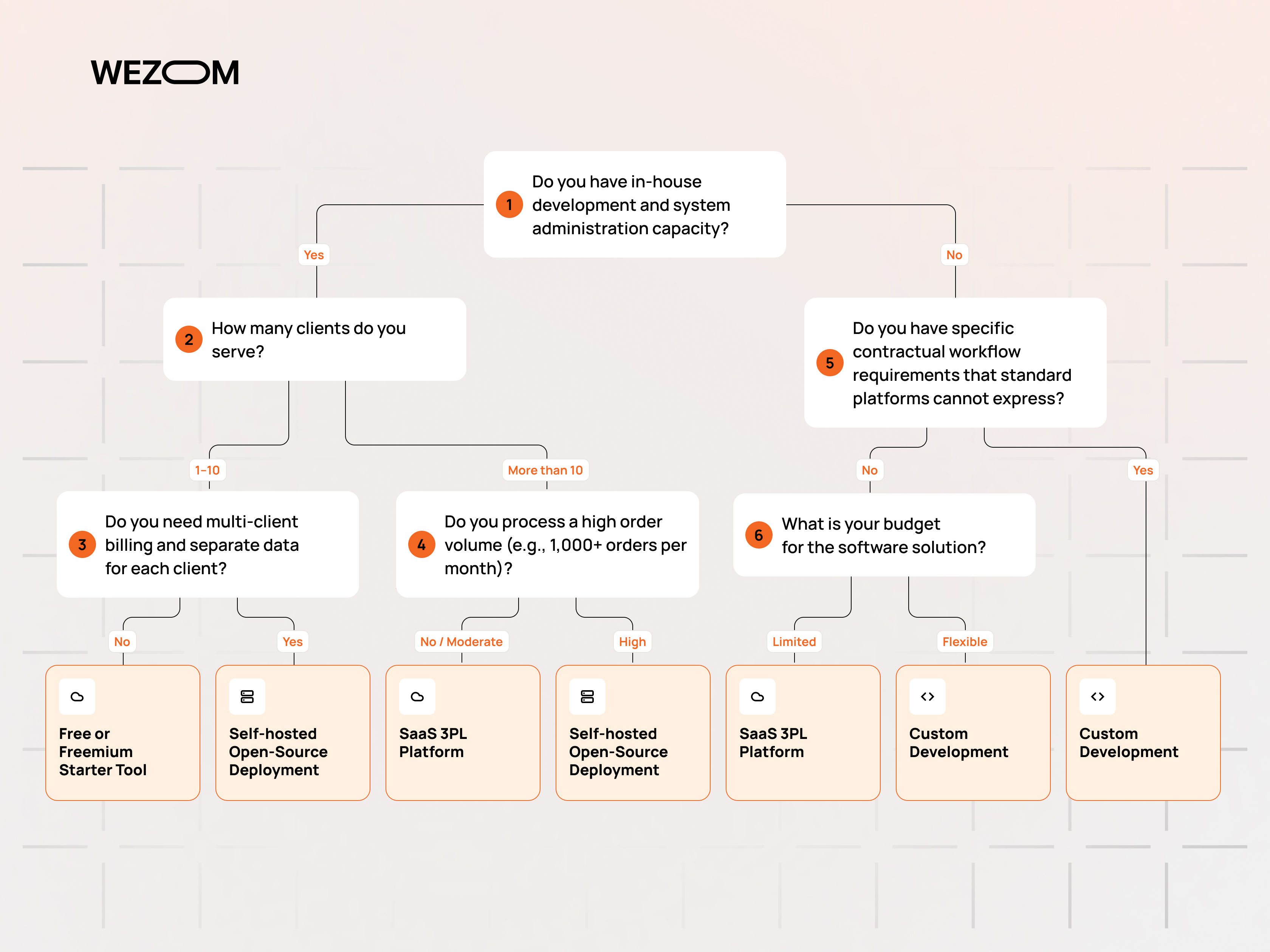
A modest platform with reliable integrations usually outperforms a richer system that requires files to be moved by hand.
Shopify, WooCommerce, Amazon, and E-Commerce Integrations
A useful e-commerce integration pulls orders with the attributes fulfillment needs, pushes inventory back per client, and returns tracking to the order record. Shopify integration and WooCommerce integration are widely available; Amazon adds seller-fulfilled requirements and stricter timing that not every connector implements fully.
Shipping Carrier and Rate-Shopping Integrations
Carrier connectivity covers label generation, tracking retrieval, manifesting, and rate quoting. Rate shopping compares negotiated rates across carriers and services at label time using dimensions, weight, zone, and service commitment, then applies the client's shipping rules.
Accounting Software and ERP Connectivity
The 3PL platform generates invoices from warehouse activity, but the receivables ledger normally lives in accounting software, so a working integration transfers invoices, credits, and customer records to systems such as QuickBooks or Xero without re-entry. Larger clients may run an ERP expecting inventory positions or receipt confirmations on a schedule.
API and EDI Integration for B2B Customers
Retail and B2B clients bring transaction sets rather than storefronts. The common warehouse documents are the 940 shipping order, the 943 and 944 transfer pair, the 945 shipping advice, the 947 inventory adjustment advice, and the 846 inventory advice, often alongside an 856 ASN to the end retailer. API integration serves the same purpose for modern systems with lower setup effort, and a platform offering neither costs the provider a contract the first time a client requires compliance.
Marketplace, OMS, and Customer Order Synchronization
Clients selling across several marketplaces often run an order management system that consolidates channels before sending orders onward, and integrating once with that OMS is cleaner than maintaining separate marketplace connectors.
Why Integration Quality Matters More Than a Long Feature List
Connector lists describe existence, not depth. The separating questions are which fields transfer, how often synchronization runs, what happens to a failed message, whether errors surface in a queue someone monitors, and whether the vendor or a third party maintains the connector.
How to Choose 3PL Software Without Overbuying
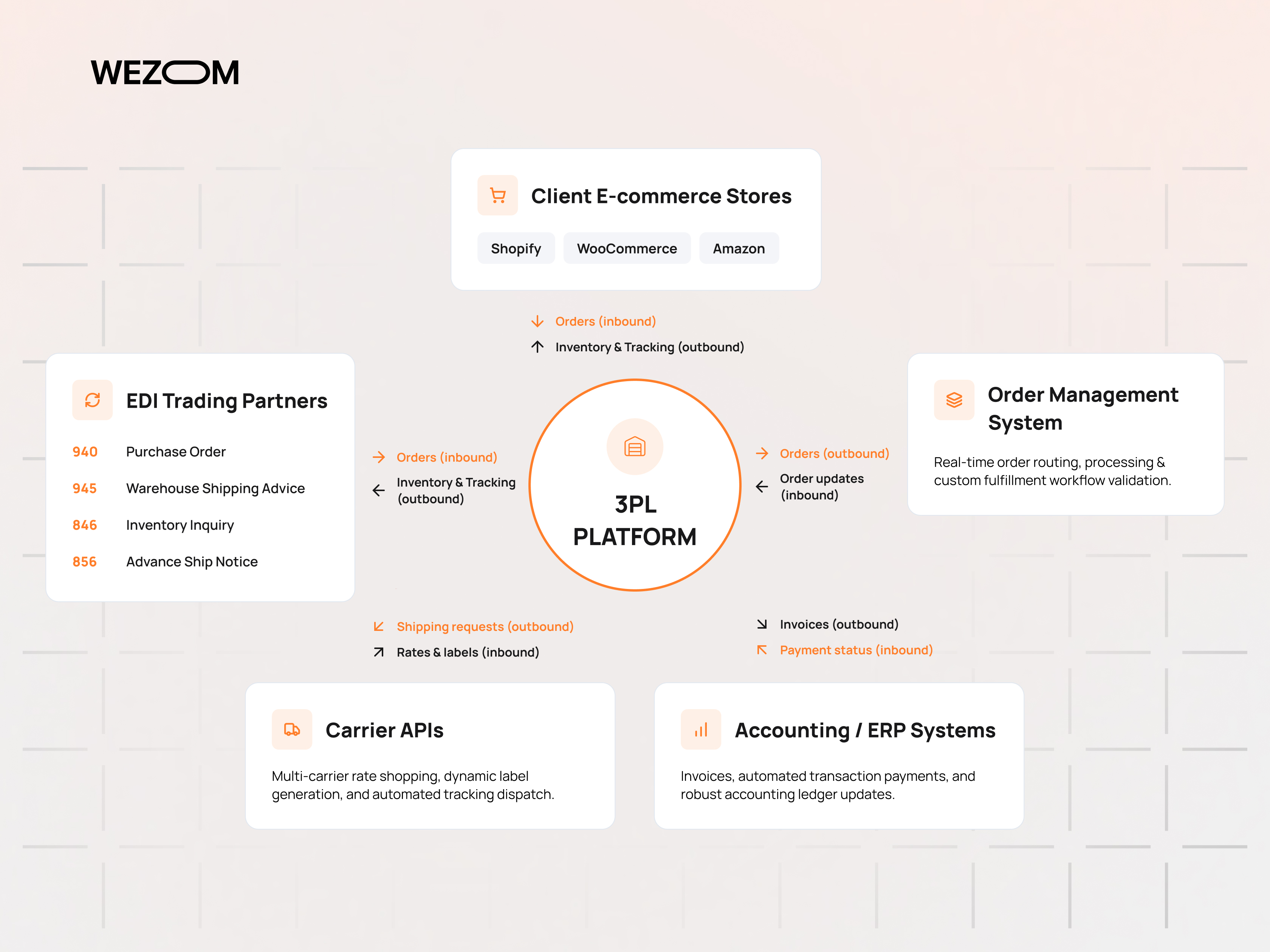
Overbuying happens when the vendor conversation begins before the operation has been described in numbers.
Start With Order Volume, SKU Count, Clients, and Warehouse Complexity
Document current and projected figures: daily and peak orders, lines per order, active SKUs per client, client count, facilities, storage types, and the share of B2B against direct-to-consumer volume. These determine pricing tier and module requirements.
Map Current Receiving-to-Shipping Workflows Before Comparing Vendors
Write down how goods actually move today, including the exceptions: short receipts, client-specific packing rules, temperature-controlled or hazardous handling, kitting, and returns. Exceptions are where implementations fail, so a documented workflow turns a demo from a presentation into a test.
Identify Must-Have, Soon-Needed, and Optional Features
Sort requirements into capabilities without which the operation cannot run, capabilities needed within roughly a year, and capabilities that are merely desirable. Must-haves determine which vendors qualify; soon-needed items decide whether the platform can grow without replacement.
Calculate Software Cost per Order and per Client
Dividing annual software cost by shipped orders produces a figure comparable to the fulfillment fee charged per order, and the same calculation per client shows whether small accounts stay profitable once software cost is allocated.
Test Real Warehouse Scenarios During a Demo or Free Trial
A trial should run the operation's own cases rather than the vendor's prepared path: receive against a purchase order with a short quantity, pick a multi-line order across zones, ship on a carrier account, and generate an invoice from a real rate card.
Check API Access, Data Export, and Migration Options Before Signing
Confirm which data can be exported, in what format and at what frequency, and whether historical transactions and billing records are included or only current inventory. Verify whether API access is standard or a paid tier, and what happens to data access after cancellation.
When a Small 3PL Has Outgrown Its Current Software
Software rarely fails visibly. It degrades into manual compensation, and the signals below appear well before anyone proposes a replacement.
Manual Work and Spreadsheets Start Creating Fulfillment Bottlenecks
Exports and re-imports between systems, orders copied from email into the warehouse system, and inventory maintained in a parallel spreadsheet are workarounds for missing capability, and the cost is measurable in staff hours per week plus the errors those hours introduce.
Inventory Errors and Client Reporting Become Difficult to Control
Rising adjustment volume, recurring shortage claims, and cycle counts that disagree with system quantities point to gaps in transaction capture rather than careless staff. The reporting symptom follows, as client questions take hours to answer because numbers must be assembled from several places. Accurate 3pl inventory management software surfaces both problems at the transaction level instead of at month-end.
Billing Complexity Exceeds Basic Inventory Software
Tiered storage, minimum monthly charges, per-line pick fees, and bundled value-added services do not fit a system built for simple inventory, so invoices move to a spreadsheet. Invoicing that takes several days and generates client disputes is a revenue problem that usually justifies the software change on its own.
More Warehouses, Sales Channels, and Clients Require Automation
Allocation across sites, per-channel inventory publishing, and per-client rules reach a point where manual coordination stops scaling, and the failure appears as oversells, missed cutoffs, and delayed onboarding of accounts the sales team has already signed.
Moving From Basic WMS to Custom or Scalable 3PL Software
A larger commercial platform delivers proven capability and a defined implementation path, suiting providers whose requirements are demanding but conventional. Custom development suits providers whose workflow or billing model is itself the commercial advantage. Either way, data migration governs the timeline, since client records, SKU masters, locations, open orders, historical transactions, and rate cards all need mapping, cleaning, and validation before cutover.
FAQ
Can a very small 3PL start with spreadsheets instead of dedicated software?
For one or two clients, low volume, and simple storage billing, spreadsheets work, and many providers begin there. The limits appear when concurrent access, transaction history, and client separation start to matter. A spreadsheet holds no audit trail of who moved which unit and when, which makes shortage claims unresolvable, and it cannot update a client's storefront inventory.
Does a small 3PL need a customer portal from day one?
Not on day one, but it is among the earliest additions worth funding. Two or three clients can be served by email and scheduled reports; beyond that, the same requests repeat daily and consume the time of whoever answers them.
Can one 3PL platform manage both B2B and direct-to-consumer fulfillment?
Yes, though the two profiles stress different capabilities. Direct-to-consumer work demands high order counts, parcel rating, and channel synchronization, while B2B work demands pallet handling, routing guide compliance, EDI documents, ASNs, and retailer-specific labeling. Platforms usually lead in one and cover the other adequately, so a provider with meaningful volume in both should test the weaker side during evaluation.
Should accounting functionality be built into 3PL software or integrated separately?
Warehouse activity billing belongs in the 3PL platform, because only that system holds the events being billed. General ledger, payables, tax handling, and financial reporting belong in accounting software, and the connection between them should be automated invoice and credit transfers rather than a shared module.
What KPIs can show whether new 3PL software is paying for itself?
Track orders shipped per labor hour, inventory accuracy from cycle counts, on-time shipping against client cutoffs, order error rate, days to issue monthly invoices, invoice disputes per period, and software cost per order and per client. Capture a baseline before implementation, since the comparison is what makes the numbers meaningful.
How difficult is it to migrate inventory and client data to another 3PL system?
The difficulty is data quality rather than technical transfer. Client records, SKU masters with units of measure and dimensions, locations, on-hand quantities, open orders, rate cards, and historical transactions all need extraction, mapping, and validation, and duplicate or inconsistent SKU data is the usual obstacle.
Does a small warehouse need mobile scanners, or are smartphones sufficient?
Smartphones with camera-based scanning are workable at low volume. Dedicated devices earn their cost through scan speed, one-handed operation, battery life across a full shift, and durability where devices get dropped. Volume and shift length, rather than software capability, determine when dedicated hardware pays back.
