
Most wholesale revenue comes from customers who order the same products again and again: a restaurant restocking dry goods every Tuesday, a contractor replenishing fasteners, a clinic reordering gloves and syringes. Even so, many distributors still take these orders through email, phone, and spreadsheets, and staff retype each line into the ERP. A B2B ordering portal moves that repeat purchasing into a self-service channel where buyers see their own catalog, contract prices, and stock levels, and orders flow into back-office systems without rekeying. Below: how such portals work, which features and integrations automate repeat orders, and what development involves.
Why Traditional B2B Ordering Processes Slow Down Wholesale Sales
Manual order entry through emails, phone calls, and spreadsheets
In a manual setup, a buyer emails a PDF purchase order or reads a list over the phone, and an inside sales rep keys it into the ERP. Every order costs staff time regardless of value. Orders arrive in inconsistent formats: customer part numbers instead of internal SKUs, outdated product names, quantities in cases when the system expects units.
Common challenges with recurring wholesale orders
Recurring orders are predictable, yet manual processes treat each one as new. Buyers rebuild the same list every week, often by copying an old email and editing it, which carries forward discontinued items and wrong quantities. When a regular customer forgets to order, nobody notices until they buy elsewhere.
How ordering errors, pricing inconsistencies, and inventory gaps affect distributors
Rekeying produces wrong SKUs, transposed quantities, and missed lines, each of which causes a return, a credit note, or an emergency delivery. Pricing problems are harder to detect: a rep applies last year's contract price or forgets a volume tier, and the error surfaces only as an invoice dispute weeks later. Without real-time stock availability, buyers order items that are out of stock, and backorders get discovered at the picking stage. All three trace back to one cause: buyer, rep, and ERP work from different versions of the data.
What Is a B2B Ordering Portal and How Does It Work?
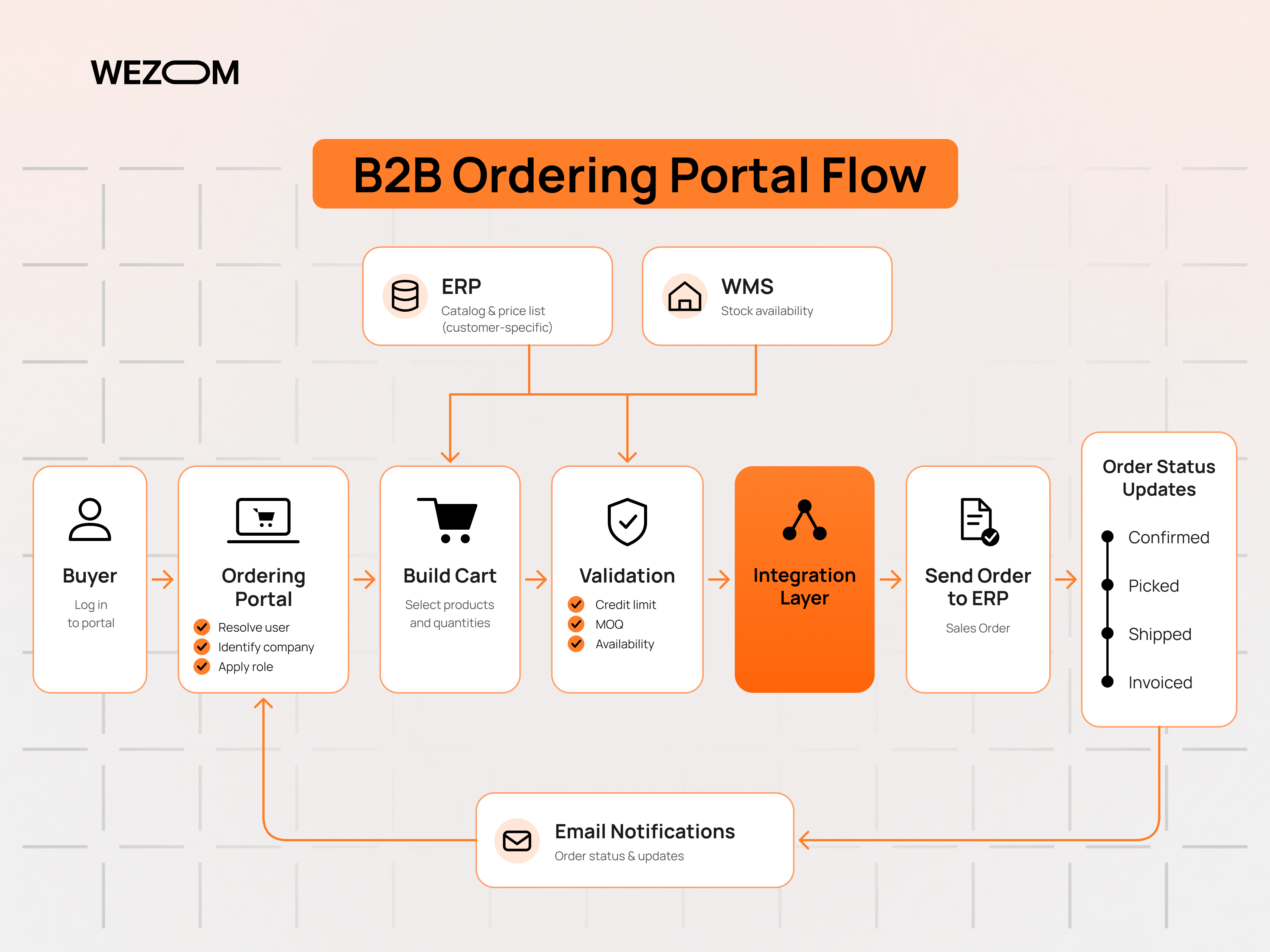
How a self-service B2B portal connects wholesalers and business customers
A B2B portal is a secure, login-based web application where business customers place and manage orders with a supplier. Each buyer sees an account-specific view: the assortment they are allowed to buy, their negotiated prices, payment terms, open orders, invoices, and history. As a self-service customer portal, it takes transactional work off reps, who can focus on accounts and exceptions.
B2B ordering portal vs traditional ecommerce website
A B2C store shows one public catalog and price list to anonymous visitors who pay by card at checkout. A B2B ordering portal is account-based: prices depend on contracts, catalogs are filtered per customer, several users act on behalf of one company, and orders are usually paid later against invoice under agreed terms. Wholesale buyers also know what they need and value quick SKU entry over product pages. Rules such as minimum order quantity (MOQ), case-pack multiples, and delivery cut-off times rarely exist in consumer ecommerce.
B2B sales portal vs CRM and ERP systems
The ERP is the system of record for items, prices, stock, orders, and financials. The CRM holds customer relationships, contacts, opportunities, and sales activity. A B2B sales portal is the customer-facing layer that exposes selected ERP and CRM data to buyers and writes orders back. Problems start when a portal stores its own price lists or customer records, because two sources of truth drift apart. In a sound architecture, the portal reads master data from the back office and owns only what is specific to the online experience, such as saved lists, user preferences, and session data.
How customer accounts, product catalogs, and order workflows interact
When a buyer logs in, the portal identifies the user, the company account, and the user's role. The account determines the catalog and price list; the role determines what the user may do, for example place orders up to a limit or only view invoices. Products shown are filtered by the account's assortment, prices are calculated from contract terms, and stock is shown from the warehouses that serve that customer. A submitted order passes validation for credit, MOQ, and availability, then moves to the ERP as a sales order, and status updates flow back to the buyer.
How B2B Portals Automate Repeat Orders
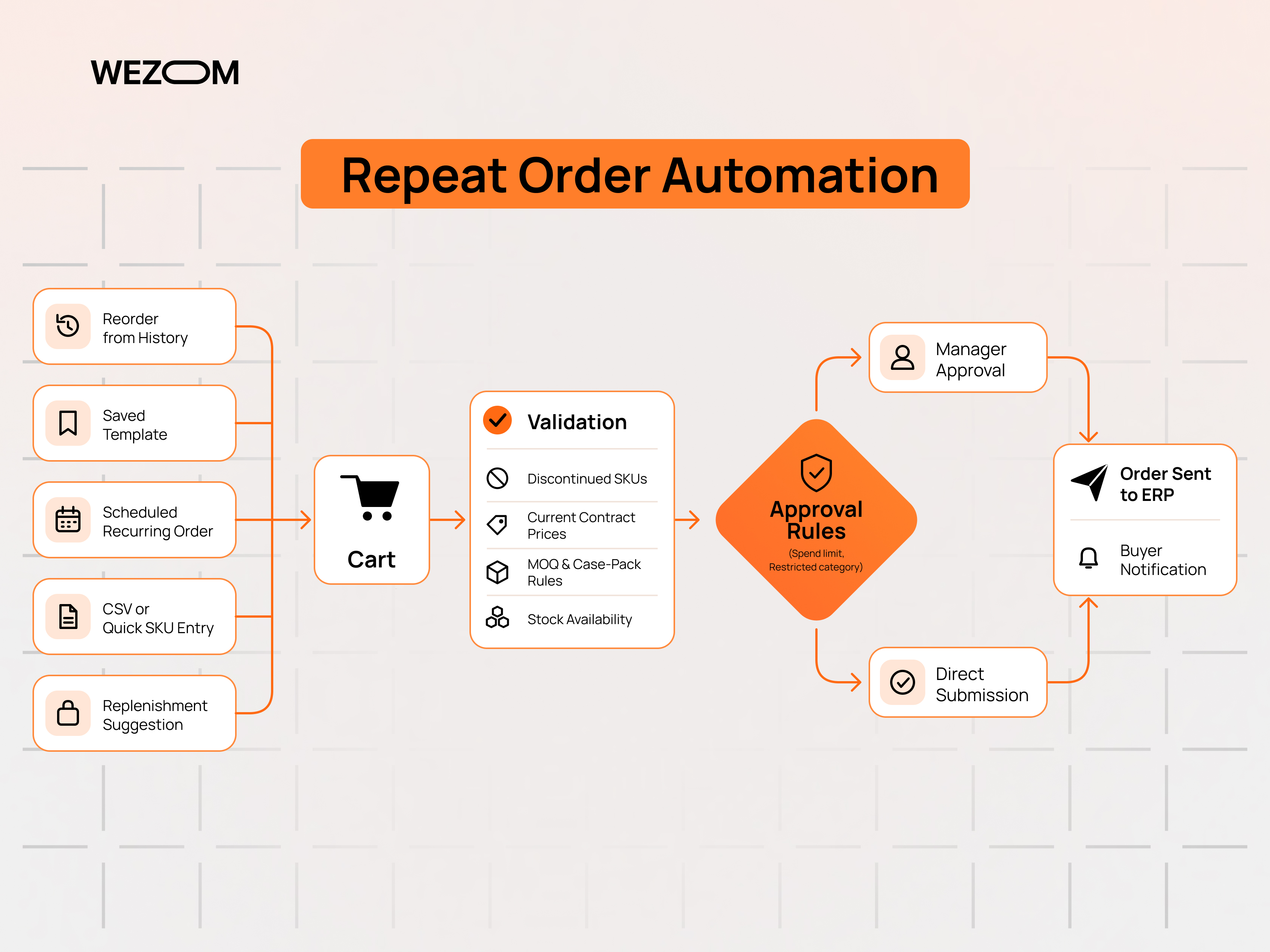
Repeat order automation is the main reason distributors invest in B2B portals. The mechanisms below range from simple shortcuts to fully automated replenishment.
One-click reordering from purchase history
Order history and reorder functions let a buyer open a past order, review it, and add all lines to the cart at current prices. The portal must recheck each line: discontinued items are flagged or replaced with a successor SKU, prices are recalculated from the active contract, and availability is refreshed.
Saved order templates and frequently purchased product lists
Templates, often called requisition lists, hold standard orders such as a weekly kitchen restock or a monthly maintenance kit. Buyers adjust quantities and submit. Frequently purchased lists are generated from history and sorted by purchase frequency, so a buyer with hundreds of possible SKUs sees the forty they actually use first. Head office can publish locked templates for branches.
Scheduled recurring orders and subscription-based purchasing
Recurring order management lets a buyer set an order to repeat on a schedule, for example every Monday or the first of each month. The portal creates the order automatically before the delivery cut-off and notifies the buyer, who can skip or edit that cycle. The design questions are practical: stock-outs on the scheduled date, price changes, and holiday delivery shifts.
Bulk ordering through SKU entry and CSV uploads
Experienced buyers prefer quick order forms where they type SKUs and quantities line by line or paste a list from a spreadsheet. CSV upload supports bulk order processing for orders with hundreds of lines exported from the buyer's own procurement or inventory system. Good implementations map customer part numbers to internal SKUs, report invalid lines clearly instead of rejecting the whole file, and round quantities to case-pack multiples with a visible warning.
Automated replenishment based on stock levels and purchasing patterns
The most advanced form of supply chain automation generates suggested orders before the buyer asks. Data comes either from consumption patterns in order history or from the customer's own stock levels, shared through an integration or scanned by vendor-managed inventory staff on site. The portal proposes quantities that bring stock back to agreed levels, and the buyer approves or edits. Buyers rarely trust quantities they cannot trace back to data, so suggestions need explanations.
Order approval workflows for corporate buyers
Order approval workflows route orders that exceed a spending limit, include restricted categories, or come from certain users to a manager before submission. This form of purchase order automation matters for corporate and institutional customers, whose internal controls would otherwise force them to keep ordering by email.
Essential B2B Portal Software Features for Wholesalers and Distributors
Beyond reordering tools, B2B portal software for distribution needs commercial and account features that mirror how wholesale relationships actually work.
Customer-specific catalogs, negotiated pricing, and volume discounts
A digital wholesale catalog should show each account only its approved assortment. Customer-specific pricing comes from contract price lists, customer group prices, and promotional agreements, and custom pricing and volume discounts often stack: a contract price, a quantity break at 50 units, and a mixed-case discount. The pricing engine has to calculate these the same way the ERP does, or the invoice will not match the portal.
Real-time inventory visibility across multiple warehouses
Buyers need to know whether an item ships today, from which warehouse, and when a backordered item will return. Portals usually show available-to-promise stock rather than raw on-hand quantity. Distributors with several warehouses must decide whether to show stock per location, total network stock, or only stock from the customer's assigned warehouse.
Credit limits, payment terms, and invoice management
Most wholesale customers buy on account, so B2B payment terms such as net 30 or net 60 are standard. The portal shows the available credit, blocks or routes orders that would exceed the limit, and lets finance users view open invoices, download copies, and pay balances online.
Multi-user accounts with roles and purchasing permissions
Multi-user purchasing accounts reflect real organizations: a purchasing manager, several branch buyers, an approver, and an accounts payable clerk. Roles control who can order, who can approve, who sees prices, and who can only view invoices. Customers usually administer their own users.
Personalized product recommendations and cross-selling
Recommendations in wholesale work best when tied to purchasing logic: accessories bought with a main item, replacement parts for installed equipment, or products similar customers order that this account does not.
Shipment tracking, backorders, and order status notifications
After submission, buyers need status per order and per line: confirmed, partially shipped, backordered, delivered. Carrier tracking, restock dates, and notifications remove most "where is my order" calls.
Mobile-friendly ordering for purchasing teams and field sales representatives
Buyers in kitchens, workshops, and job sites often order from phones, so quick order and reorder screens must work on small screens, ideally with barcode scanning. Field sales reps use the same portal to place orders on behalf of customers during visits, seeing the customer's prices and credit status rather than a separate price book.
B2B Ordering Portal Integrations That Enable End-to-End Automation
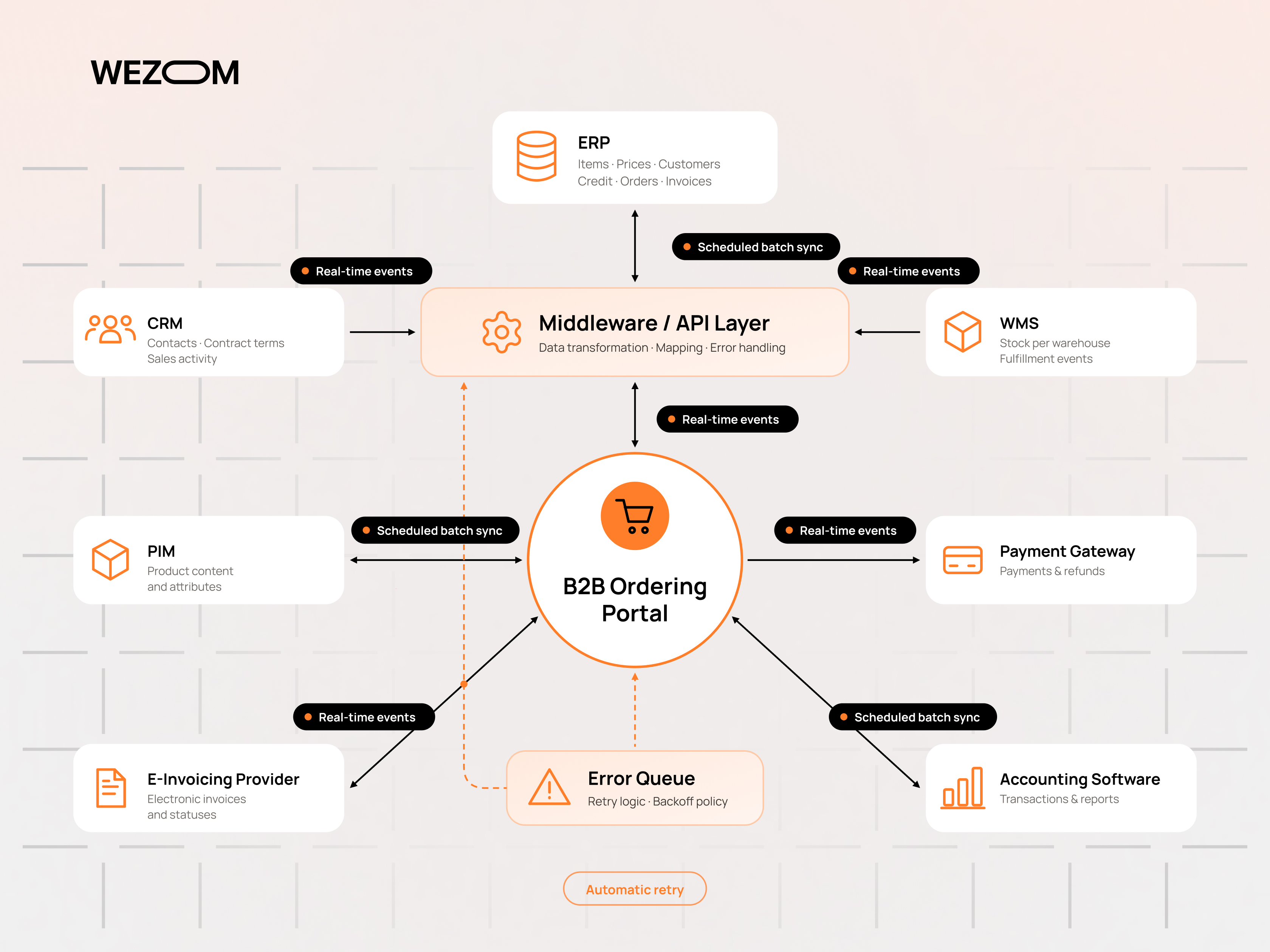
ERP integration for order processing, pricing, and financial data
ERP integration is the core of automated order processing. Item master data, price lists, customer accounts, credit status, and invoices flow from the ERP to the portal; orders flow back as sales orders. Pricing is the most sensitive area. Teams choose between replicating price rules into the portal for speed or calling the ERP pricing service in real time for accuracy, and many use a combination of cached prices with a real-time check at checkout.
CRM integration for customer profiles and sales activity
CRM integration keeps contacts, account ownership, and contract terms aligned, and gives reps visibility of portal activity: abandoned carts, falling order frequency, or new product interest.
WMS integration for inventory synchronization and fulfillment
Inventory synchronization with the warehouse management system supplies stock per location and fulfillment events such as picking, packing, and shipment. Where the ERP already aggregates WMS data, the portal may read from the ERP; where stock changes quickly, a direct event feed from the WMS reduces the risk of selling stock that was just allocated.
PIM integration for centralized product information
A PIM system supplies descriptions, technical attributes, images, and documents such as safety data sheets. Attribute completeness in the PIM directly determines how well buyers can search and filter large wholesale catalogs.
Payment gateways, accounting software, and electronic invoicing
Card and bank payments for open balances or for prepaid accounts run through payment gateways, with settlements reconciled in accounting software. Many countries require or are introducing structured electronic invoicing, for example through Peppol-based networks in parts of Europe, so invoice generation may involve a certified e-invoicing provider rather than PDF emails.
API architecture and data synchronization between business systems
Integration patterns depend on data volatility. Master data such as products and price lists often moves in scheduled batches, while orders, stock changes, and status updates move as events through APIs or message queues. A middleware or integration layer handles transformation, retries, and error queues, so a temporary ERP outage delays orders instead of losing them. Legacy system integration may require file-based exchange or database connectors when the ERP offers no modern API.
B2B Portal Examples and Industry-Specific Ordering Workflows
The B2B portal examples below show how the same core platform is configured differently depending on what customers buy and how often.
Food and beverage distribution: frequent replenishment and delivery schedules
Restaurants and retailers order several times a week against fixed delivery days and cut-off times. Portals emphasize order guides, recurring orders, substitutions for out-of-stock items, and catch-weight products priced by actual weight.
Industrial supplies: SKU-based ordering and customer-specific catalogs
Maintenance buyers know part numbers and want fast SKU entry, cross-references from manufacturer and customer part numbers, and catalogs restricted to approved items. Large accounts may connect through punch-out from their e-procurement system, transferring the cart back for internal approval.
Automotive parts distribution: compatibility search and bulk purchases
Workshops search by vehicle rather than SKU. Fitment search based on year, make, and model, typically built on ACES and PIES data in North America, prevents wrong parts from being ordered. Multiple daily deliveries and core returns shape the workflow.
Medical supplies: purchasing approvals and traceability
Hospitals and clinics require strict approval chains, formulary-restricted catalogs, and traceability of lot numbers and expiry dates. Unique device identification requirements in regulated markets mean product data and shipment records must carry identifiers through to the customer.
Construction materials: tiered pricing and multi-location deliveries
Contractors buy for several job sites, each with its own delivery address, schedule, and sometimes its own price agreement. Portals need job-based ordering, project pricing, delivery slot booking, and visibility of quantities already delivered against a project quote.
Custom B2B Portal Development vs Ready-Made Ordering Platforms
When off-the-shelf B2B ecommerce software is sufficient
A ready-made B2B ecommerce platform fits when pricing rules, catalog structure, and approval logic match what the platform supports natively, and a standard connector exists for the ERP. Launch is faster, and the vendor maintains core features.
When custom B2B portal development becomes necessary
Custom B2B portal development becomes justified when pricing logic is complex enough that platform extensions would rebuild most of the engine, when the ERP is a legacy or heavily customized system without connectors, or when workflows such as catch-weight, fitment, or job-based ordering define the business.
Comparing flexibility, integrations, scalability, and ownership
The fit depends on how far requirements diverge from platform defaults.
| Factor | Ready-made platform | Custom development |
|---|---|---|
| Flexibility | Limited to configuration and extensions | Built around the distributor's own rules |
| Integrations | Prebuilt connectors for common ERPs | Designed for any system, including legacy |
| Scalability | Depends on vendor plan and limits | Architecture chosen for expected load |
| Ownership | Subscription, vendor roadmap | Code and data owned by the business |
| Time to launch | Shorter | Longer initial build |
Headless commerce and modular architecture for complex distribution networks
Headless B2B commerce separates the buyer-facing front end from commerce services such as catalog, pricing, cart, and order management, which communicate through APIs. This allows a distributor to use a commercial engine for standard functions while building custom pricing services, fitment search, or a mobile app for field reps. The cost is more integration points to operate and monitor.
B2B Portal Development Process: From Business Requirements to Launch
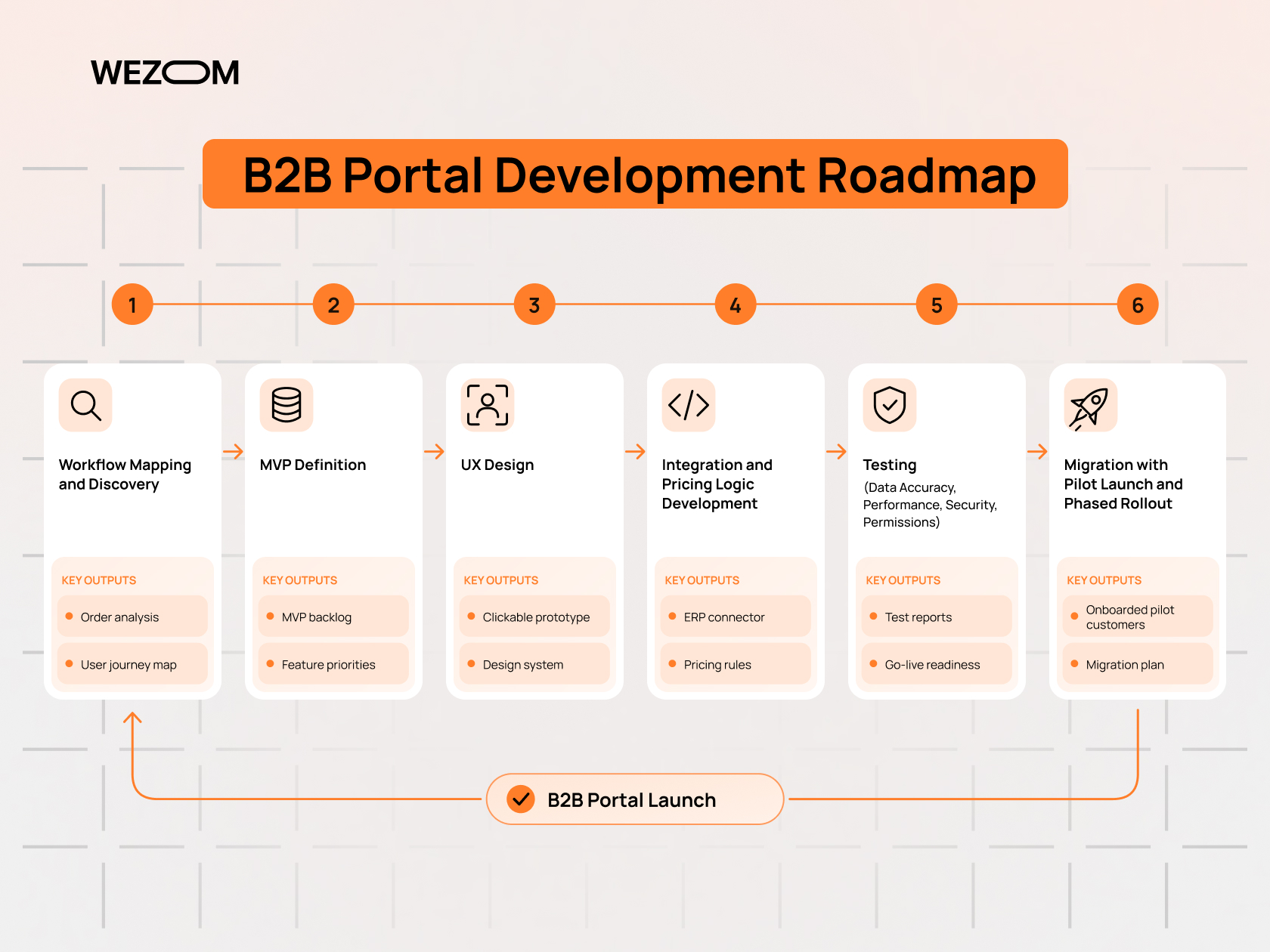
Mapping existing order workflows and identifying automation opportunities
Discovery traces how orders actually arrive, what reps check before entry, where pricing exceptions occur, and which customers generate the most manual work. Order history shows how many orders are near-repeats.
Defining MVP features for a wholesale ordering portal
A sensible MVP for wholesale ordering software usually includes login with company accounts, customer-specific catalog and pricing, quick order and reorder, order history, invoice view, and ERP order transfer. Approval workflows, replenishment suggestions, and recommendations can follow once adoption is established.
Designing UX for fast repeat purchasing and account management
UX for wholesale buyers favors speed over browsing: the reorder list on the dashboard, keyboard-friendly quick entry, persistent carts, and clear MOQ or stock messages at line level.
Building integrations, pricing logic, and automated order processing
This phase connects ERP, WMS, and other systems, implements pricing calculations, and defines what happens when an order fails validation in the ERP. Exceptions should land in a queue visible to staff with a clear reason, never disappear silently.
Testing data accuracy, performance, security, and user permissions
Testing compares portal prices with ERP prices across real customer accounts, checks stock accuracy, and load-tests peak periods such as Monday morning order rushes. Security testing covers authentication, data isolation between customer accounts, and role permissions, since one customer seeing another's prices is a serious breach.
Migrating customers, onboarding buyers, and launching the portal
B2B portal implementation succeeds or fails on adoption. Teams import customer accounts and users, preload order templates from history, and often launch with a pilot group before rolling out by region or segment. Reps drive adoption by demonstrating the portal during visits.
How Much Does B2B Portal Development Cost?
Main cost drivers: functionality, integrations, and customization
Cost depends mostly on the number and complexity of integrations, the complexity of pricing rules, the number of customer-specific workflows, and whether the project starts from a platform or from scratch. Integration with a legacy ERP and data cleanup in product and customer master data are the items most often underestimated.
MVP vs enterprise B2B ordering portal development budgets
An MVP on a platform with a standard ERP connector sits at the lower end of the range. Enterprise projects with several ERPs after acquisitions, multiple countries, headless architecture, and custom pricing services cost several times more. Reliable budgets come after discovery, once integrations and pricing rules are documented.
Ongoing maintenance, hosting, support, and scalability costs
After launch, recurring costs include platform licenses or hosting, monitoring of integrations, security updates, support, and continued feature development. Over several years these can rival the initial build.
Evaluating ROI through reduced processing costs and increased order frequency
ROI is calculated from measurable changes: order entry hours saved, fewer credit notes from errors, reduced customer service contacts, and incremental revenue from higher order frequency and larger baskets. Baselines from the current manual process, captured before launch, make the calculation defensible.
How to Measure B2B Ordering Portal Performance
Self-service adoption rate and share of orders placed online
The primary metric is the share of orders and revenue coming through the portal, tracked by customer segment and by rep territory.
Repeat order frequency, average order value, and customer retention
Order frequency and average order value per account show whether reorder tools change behavior. Customer retention in wholesale can be tracked through accounts whose order intervals lengthen, an early warning sign that a customer is shifting volume to a competitor.
Order processing time, error rate, and operational cost per order
Time from order submission to ERP confirmation, the share of orders needing manual intervention, and credit notes caused by order errors show operational impact. Operational cost per order compares portal orders with manual ones.
Tracking buyer satisfaction and identifying friction in the ordering process
Search queries without results, abandoned carts, failed CSV uploads, and support tickets about the portal reveal friction. Interviews with key accounts add context that analytics miss and improve the wholesale customer experience.
Choosing a B2B Portal Development Company
Experience with wholesale distribution and complex B2B purchasing workflows
A B2B portal development company should understand contract pricing, MOQ and case-pack logic, credit terms, approvals, and multi-branch accounts.
ERP, CRM, and WMS integration capabilities
Ask which ERPs and WMSs the team has integrated, how they handle pricing synchronization, and how they monitor integration failures in production.
Questions to ask providers of B2B portal development services
Useful questions for providers of B2B portal development services include:
- Which wholesale pricing and ordering scenarios have you implemented?
- How do you handle ERP downtime and failed orders?
- Will you recommend a platform or custom build, and on what criteria?
- How do you plan customer onboarding and adoption?
- What does post-launch support include?
Evaluating technical expertise, project delivery, and post-launch support
Review architecture proposals, sample documentation, and delivery practices such as staged releases and automated testing. Post-launch support terms should define response times for integration incidents, because a failed order sync directly stops revenue.

FAQ
Can a B2B ordering portal support multiple currencies and languages?
Yes. The portal assigns currency and language per account or storefront, with price lists maintained per currency in the ERP rather than converted on the fly, which avoids rounding disputes. Product content in several languages comes from the PIM, and tax rules, invoice formats, and payment methods vary by country.
Can customers place wholesale orders without immediate online payment?
Yes, and for most wholesale customers this is the default. Orders are placed on account under agreed payment terms, validated against the credit limit, and invoiced after shipment. New accounts may be required to prepay.
How can a B2B portal handle minimum order quantities and case-pack restrictions?
MOQ and case-pack rules are stored per product, sometimes per customer, and enforced in the cart. The portal can round quantities up to the nearest multiple with a notice, block orders below the minimum, or enforce a minimum order value per delivery.
Can wholesalers allow customers to order on behalf of multiple branches?
Yes, through account hierarchies. A parent company account contains branch accounts with their own delivery addresses, budgets, and sometimes prices. Central buyers can order for any branch, while branch users see only their own location.
How do B2B portals manage returns, refunds, and credit notes?
Buyers request returns from order history by selecting lines and reasons. The request becomes a return authorization in the ERP, and after goods are received and inspected, the ERP issues a credit note that appears in the portal and reduces the open balance.
Can an existing B2B portal be connected to legacy software?
Usually, yes. Where a legacy ERP lacks APIs, middleware can use file exchange, database connectors, or EDI to move orders and master data. The trade-off is often batch timing instead of real-time sync, which affects stock and price freshness.
How long does it take to implement a B2B ordering portal?
It depends on the starting point, integration complexity, data quality, and the scope of the MVP. A platform-based portal with a standard ERP connector moves faster than a custom build with legacy integrations, and customer onboarding adds time after technical launch.
