
A distributor's sales team spends much of its day answering the same questions: where is the order, what is my price, can you resend the invoice. The answers sit in the ERP, not on the company's website, and the only interface to them is an account manager with a phone. This is where the portal vs website question stops being theoretical. A website communicates with anonymous visitors, while a portal gives known users authenticated access to their own data and transactions. Below, we compare the two, map them to B2B scenarios, and cover what portal development involves, what it costs, and how to choose a partner.
Web Portal vs Website: What Is the Difference?
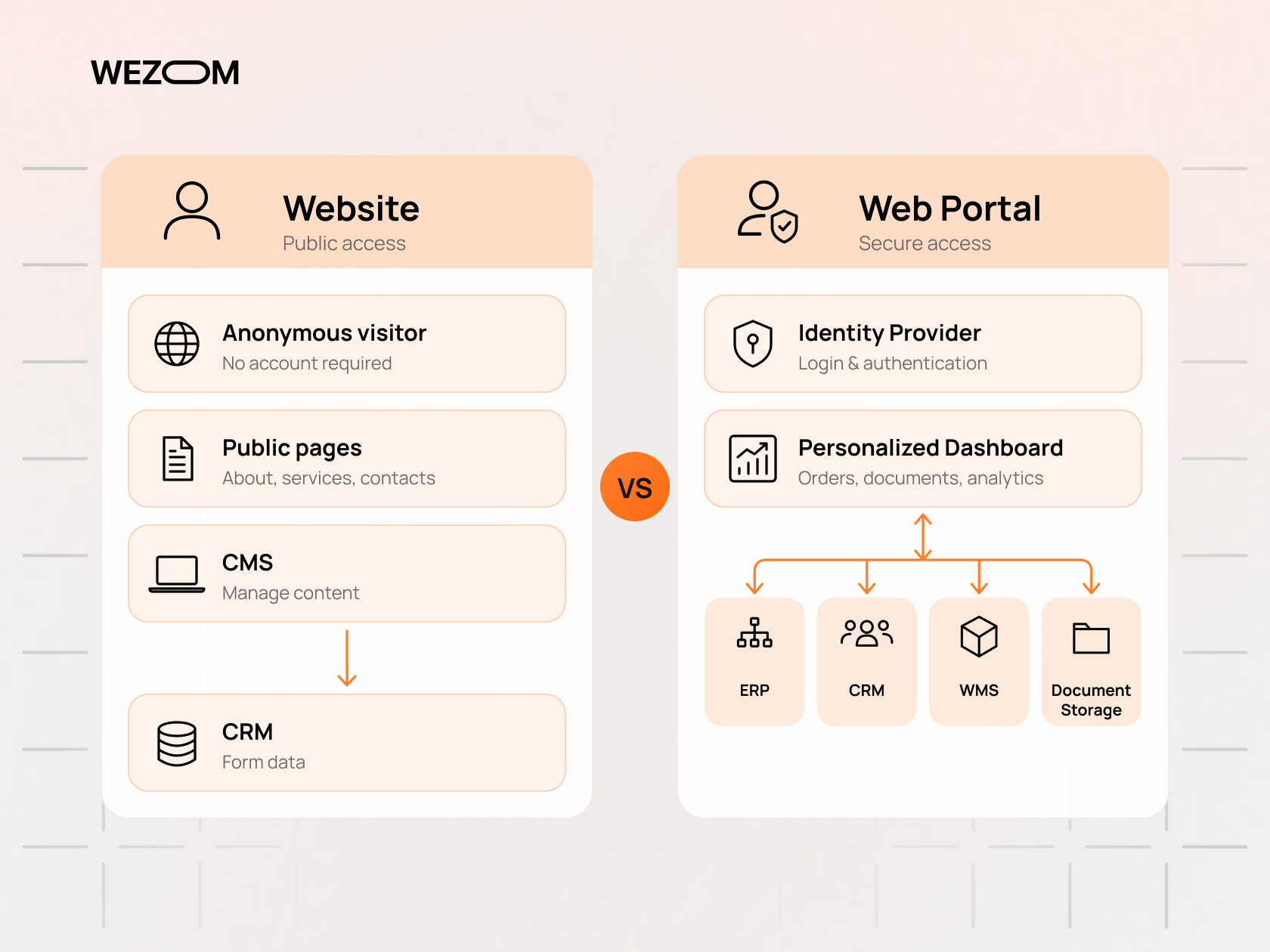
The distinction comes down to who the user is and what the system knows about them. A website treats every visitor the same. A portal starts with identity: the user signs in, and every page is assembled from data belonging to that user, their company, and their role.
What Is a Website and How Does It Support B2B Sales?
A B2B website is primarily a publishing system. Pages are managed in a CMS and served to anyone who requests them. Its commercial job sits at the top and middle of the funnel: being found in search, explaining the offer to buying committees, and converting interest into qualified leads through contact forms, demo requests, or gated content.
Interactivity on a corporate site is limited and mostly one-directional. Form submissions go to the CRM, but the site rarely reads data back from internal systems, so it cannot show a customer their contract price or open orders. That is a design choice rather than a flaw: public content has to be crawlable, fast, and identical for everyone.
What Is a Web Portal and How Does It Work?
A web portal is a secure web application that gives a defined audience a single point of access to data and services drawn from several back-end systems. Technically, it combines an identity layer (login, single sign-on, multi-factor authentication), an application layer with business logic, and an integration layer that reads and writes data in the ERP, CRM, warehouse system, or billing platform. When a dealer opens the orders page, the portal calls the ERP through an API, filters results by the dealer's account, and renders a personalized view. In the website vs web application distinction, a portal clearly belongs to the second group and behaves like a software product.
Difference Between Portal and Website: Side-by-Side Comparison
The difference between portal and website becomes clearer across the dimensions that drive architecture, budget, and ownership.
| Dimension | Corporate website | B2B web portal |
|---|---|---|
| Audience | Anonymous prospects, candidates, press | Known customers, partners, employees |
| Access | Public, no login | Authenticated, role-based permissions |
| Content | Same for every visitor, managed in a CMS | Personalized, generated from business data |
| Data flow | Mostly outbound (forms to CRM) | Two-way with ERP, CRM, WMS, billing |
| Primary goal | Visibility and lead generation | Self-service, transactions, collaboration |
| SEO role | Central | Limited to public entry pages |
| Security scope | Standard hardening, form protection | Authorization logic, audit logs, data isolation |
How Websites and Web Portals Serve Different B2B Business Goals
Most B2B organizations need both channels, mapped to different stages of the customer relationship. The public site attracts and qualifies demand; portals serve accounts, partners, and staff who already have a relationship with the company.
Corporate Websites for Brand Visibility and Lead Generation
The corporate website remains the main acquisition channel for organic search, paid campaigns, and referrals. Its effectiveness depends on content depth, technical SEO, page speed, and clear conversion paths, and in long sales cycles it gives procurement, engineering, and finance stakeholders the documentation they need before contacting sales. A login wall here would only reduce reach.
B2B Customer Portals for Self-Service and Account Management
A B2B customer portal moves routine account interactions out of email and phone queues. Typical functions include order history and status, invoice and certificate downloads, contract pricing, reordering, support tickets, and user management within the customer's own organization.
A customer self-service platform of this kind changes how account managers spend their time. Instead of copying ERP data into emails, they handle exceptions and negotiations, and customer account management becomes consistent because users see the same data internal systems hold.
Partner and Distributor Portals for Business Collaboration
Partner portal software serves resellers, dealers, distributors, and integrators. Beyond ordering, these portals often include deal registration, co-marketing materials, training tracking, and warranty claims.
A distributor portal frequently needs hierarchical access. A national distributor may manage several branches, each with its own buyers and price agreements, while the manufacturer's channel managers need visibility across all of them.
Employee Portals for Internal Workflows and Communication
Employee portals give staff one entry point to HR documents, policies, internal news, request forms, and operational tools. A field technician might see assigned jobs, parts availability, and manuals in one place. The value comes from replacing scattered spreadsheets and shared drives with structured workflow management that routes requests to the right approver automatically.
Core Features That Define Modern Web Portal Solutions
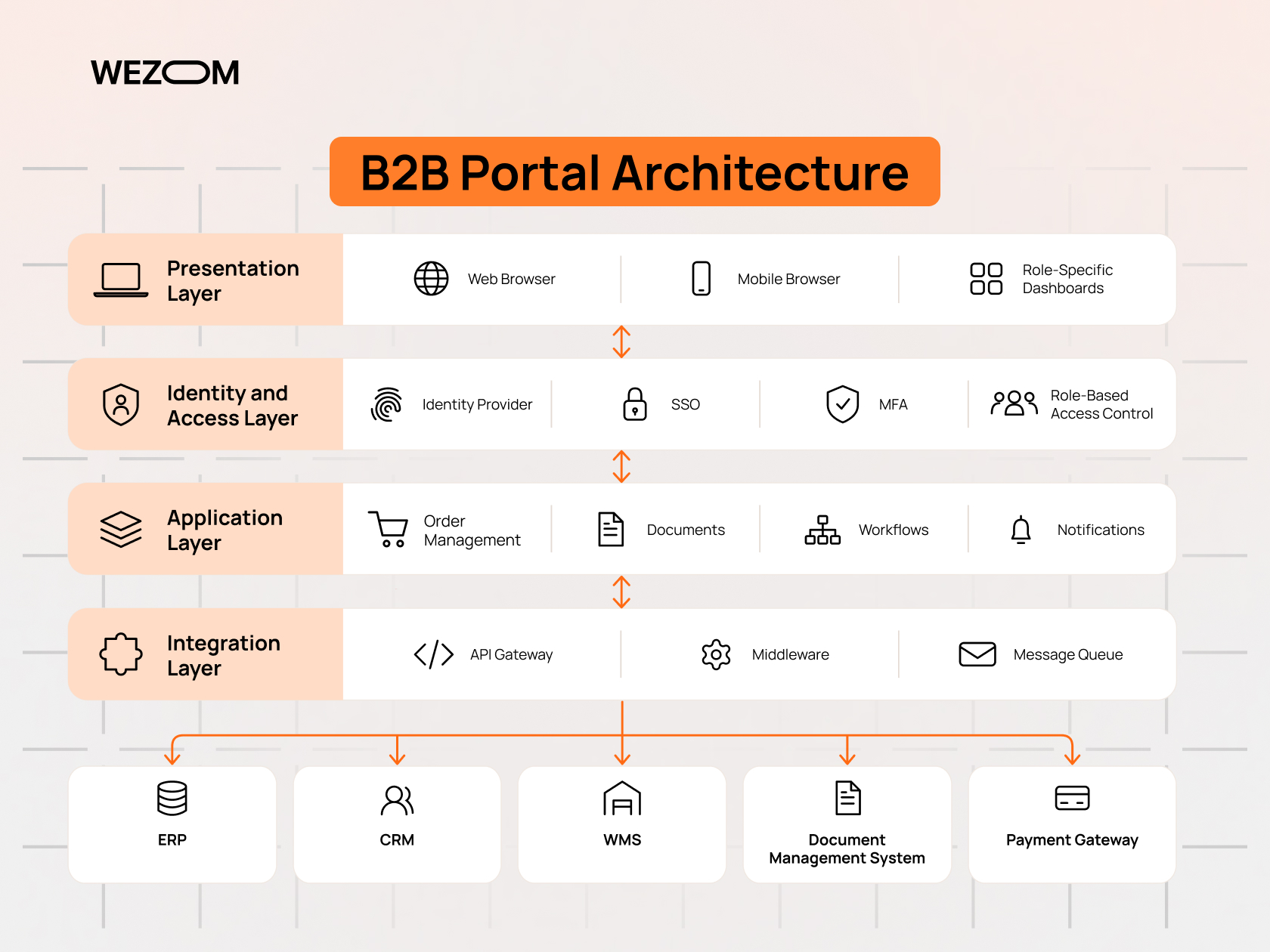
Web portal solutions vary in purpose, but most share a common feature set.
User Authentication, Role-Based Access, and Permissions
User authentication and authorization are separate concerns. Authentication confirms identity, usually through an identity provider supporting OpenID Connect, SAML-based single sign-on for enterprise customers, and multi-factor authentication. Authorization decides what an authenticated user may do.
Role-based access control assigns permissions to roles such as buyer, approver, finance viewer, or company administrator. In B2B portals, roles are scoped to an organization, so a buyer at Company A must never see Company B's orders. Some portals add attribute-based rules, such as limits by delivery location or order value. Authorization must be enforced on the server, not only hidden in the interface, because mistakes here expose data.
Personalized Dashboards and Customer Accounts
Personalized user dashboards surface what each role needs first: open orders and shipment alerts for a buyer, outstanding invoices for finance, pending approvals for a manager. B2B customer accounts are hierarchical. One company account contains multiple users, ship-to addresses, payment terms, and sometimes sub-accounts. Letting customer administrators manage their own users removes a noticeable support burden.
Document Management, Order Tracking, and Self-Service Tools
Invoices, delivery notes, certificates, contracts, and drawings can be served from an existing document management system or stored in the portal with versioning and access logging.
Order tracking connects the portal to the order lifecycle in the ERP and, for physical goods, to WMS and carrier data. Self-service tools turn returns, address changes, and quote requests into structured records instead of free-text emails.
ERP, CRM, and Third-Party API Integrations
Integration is where most portal complexity lives. ERP and CRM integration determines whether the portal shows accurate prices, stock, credit status, and account details. The usual pattern places middleware between the portal and back-end systems, exposing clean internal APIs while handling authentication, data mapping, and retries.
Real-time calls versus scheduled synchronization depends on the data. Prices and stock often need near-real-time reads, while catalog content can sync periodically. Legacy ERPs without modern APIs may need file exchange or EDI, affecting latency and cost. API integration with payment gateways and carriers adds further monitored dependencies.
Workflow Automation, Notifications, and Real-Time Data
Business process automation turns portal actions into multi-step workflows. An order above a customer's approval threshold routes to their manager; a warranty claim moves from submission to technical review to credit note without manual handoffs.
Real-time updates typically rely on events: the ERP or WMS publishes "shipment dispatched," a message queue delivers it, and the portal updates the order and sends a notification.
Web Portal Examples Across B2B Industries
The following web portal examples show how the same core features take different forms depending on industry workflows.
Manufacturing – Dealer Portals for Pricing, Inventory, and Orders
Manufacturers selling through dealer networks use portals to publish dealer-specific price lists, show inventory across warehouses, and accept orders that flow directly into the ERP. Advanced implementations add product configurators, warranty registration, and spare-parts lookup. The hardest integration is usually pricing, which combines list price, dealer tier discounts, promotions, and volume rebates.
Wholesale and Distribution – B2B Ordering and Reordering Platforms
For wholesalers, the portal often works as a B2B ecommerce platform built around repeat purchasing. A B2B ordering system here prioritizes quick entry by SKU, saved templates, CSV upload, and one-click reordering. Buyers expect contract pricing, minimum order quantities, and stock availability before submitting, so these values must come from the ERP rather than a separately maintained catalog.
Logistics – Shipment Tracking and Customer Communication
Logistics providers expose shipment status, proof of delivery, freight invoices, and booking requests through customer portals. Data from the TMS, WMS, and carriers arrives in different formats, so a good logistics portal normalizes these events into one timeline per shipment and lets customers subscribe to exception alerts, such as delays or failed deliveries.
Professional Services – Client Portals for Projects and Documents
Consulting, legal, accounting, and engineering firms use a secure client portal to exchange documents, track milestones, collect approvals, and share invoices. The focus shifts from transactions to collaboration and confidentiality, so folder-level permissions, versioning, audit trails, and e-signature integration take priority.
Insurance and Financial Services – Secure Customer and Broker Portals
Insurers and financial institutions typically run separate portals for policyholders and brokers. Customer portals handle policy documents, claims, and payments; broker portals support quoting, policy administration, and commission statements. Regulatory rules on data protection and audit logging shape the architecture heavily.
When Does a B2B Company Need a Website, a Portal, or Both?
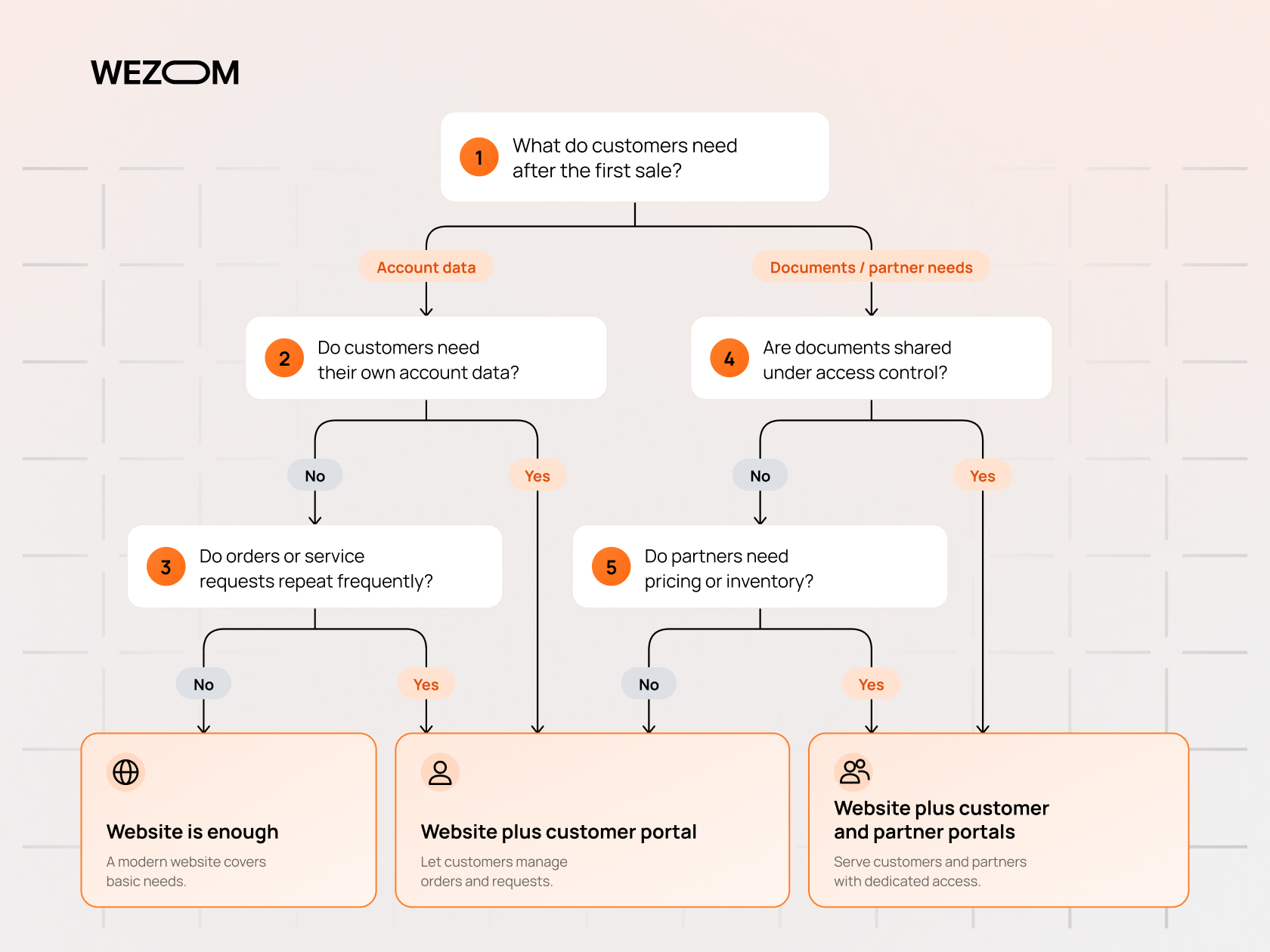
The answer depends on what customers need to do after the first sale and how much of that interaction currently relies on manual work by staff.
Business Scenarios Where a Traditional Website Is Enough
A website alone is sufficient when sales involve a few large negotiated deals, client interaction runs through project teams, and there is little recurring data for clients to access. Early-stage companies and businesses that sell entirely through distributors usually fall here.
Signs Your Company Has Outgrown Its Existing Website
Certain patterns show that the website can no longer carry the customer relationship. Account managers spend hours on status and pricing questions. Orders arrive as emails or PDFs and are re-keyed into the ERP, producing entry errors. Partners receive price lists as spreadsheets that go stale within weeks. Login plugins bolted onto the CMS create security gaps nobody owns.
When a Customer Portal Becomes a Business Necessity
A portal becomes necessary when service volume grows faster than headcount, when large customers make self-service a procurement requirement, when competitors offer online ordering and tracking as standard, or when compliance demands auditable document access. In B2B digital transformation programs, the portal is often the first customer-facing system that exposes ERP data directly, which forces a cleanup of master data and pricing rules.
Combining a Public Website With a Secure B2B Portal
Most mature B2B companies run both on separate stacks under a shared domain, such as company.com and portal.company.com. The website stays on a CMS optimized for content and SEO; the portal runs as an application with its own release cycle and security controls. Some organizations later unify both under a digital experience platform, but keeping them decoupled means a marketing redesign cannot break order processing.
Custom Web Portal Development vs Ready-Made Portal Platforms
Once a portal is justified, the next decision is whether to configure an existing product or build one. The off-the-shelf software vs custom software trade-off depends mostly on how standard the company's processes are.
When Off-the-Shelf Portal Software Meets Business Requirements
Ready-made platforms work well when processes match common patterns: a partner relationship management tool for a standard channel program, the portal module bundled with an ERP or CRM, or B2B commerce SaaS for a distributor with conventional pricing. They shorten time to launch, shift hosting and upgrades to the vendor, and suit companies willing to adapt processes to the product.
Benefits of Custom Web Portal Development for Complex B2B Operations
Custom web portal development makes sense when the portal must encode business logic that packaged tools cannot represent. Typical triggers include customer-specific pricing rules, account hierarchies across subsidiaries and regions, integration with several back-end systems including legacy ones, and industry workflows such as configure-to-order manufacturing or claims handling.
A custom build lets the data model mirror real business relationships instead of forcing them into a vendor's schema, and it gives full control over UX and the roadmap. Like any custom software development, it carries ownership duties: someone must maintain the codebase, infrastructure, and security posture over time.
Limitations of SaaS Portals, CMS Plugins, and Low-Code Platforms
SaaS portals often charge per user or per transaction, which can grow sharply once thousands of external users are onboarded. Customization stops at the vendor's extension points.
CMS plugins that add member areas suit simple gated content but struggle with complex authorization, transaction volume, and deep ERP integration, and they tie portal security to a public CMS's plugin ecosystem. Low-code platforms speed up interface building, yet complex logic, version control, automated testing, and lock-in become constraints as the portal grows.
Scalability, Flexibility, and Long-Term Ownership Considerations
Enterprise software scalability covers more than traffic. It includes onboarding new customer segments, adding regions with different tax and language rules, and connecting systems after acquisitions. For portals serving many client companies, multi-tenant architecture determines how data is isolated and how upgrades roll out. Ownership matters equally: who owns the code and data, and whether a component such as the identity provider can be replaced without a rebuild.
Web Portal Development Cost vs Traditional Website Development
Budgets differ structurally. Website development cost is driven mainly by design and content, while portal development cost is driven by logic, integrations, and security.
What Determines the Cost of a B2B Website?
A B2B website budget depends on the number of unique templates, content volume, custom design versus theme adaptation, multilingual requirements, CMS choice, and integrations with CRM, marketing automation, and analytics. Content production is frequently underestimated.
Key Cost Drivers in Portal Development
Portal costs are dominated by business logic and data. The main drivers are the number of user roles and permission rules, the number and condition of systems to integrate, data migration and cleansing, the complexity of pricing and ordering rules, compliance requirements, and expected load. Requirements uncovered mid-build are among the most expensive changes.
How Integrations, User Roles, and Automation Affect the Budget
Each integration adds data mapping, error handling, retries, monitoring, and testing with realistic data. An ERP with a documented REST API is far cheaper to connect than a legacy system exposing only database tables or flat files.
Roles multiply interface and testing effort, because each screen must be verified for every role that can reach it. A workflow that looks like three steps on a whiteboard often hides a dozen edge cases, such as partial shipments, cancelled approvals, or credit holds, that must be designed explicitly.
Total Cost of Ownership: Hosting, Security, Support, and Upgrades
Total cost of ownership includes cloud hosting for development, staging, and production; identity provider licenses; monitoring tools; penetration testing; framework upgrades; and ongoing feature work. Web portal maintenance also means adapting integrations when back-end systems change, since an ERP upgrade or new carrier API version can break portal functions if interfaces are not versioned and tested. Portal security requirements such as access reviews, vulnerability patching, and audit log retention add recurring operational work.
How to Estimate ROI From B2B Portal Implementation
Portal implementation ROI is best estimated from a baseline of current costs, not generic benchmarks. Useful inputs include monthly volumes of manual status and document requests and the time each takes, order entry hours and error-correction costs, days sales outstanding affected by invoice access and online payment, and partner onboarding time. Compare these savings with total cost of ownership over several years, not with build cost alone.
How the Web Portal Development Process Works
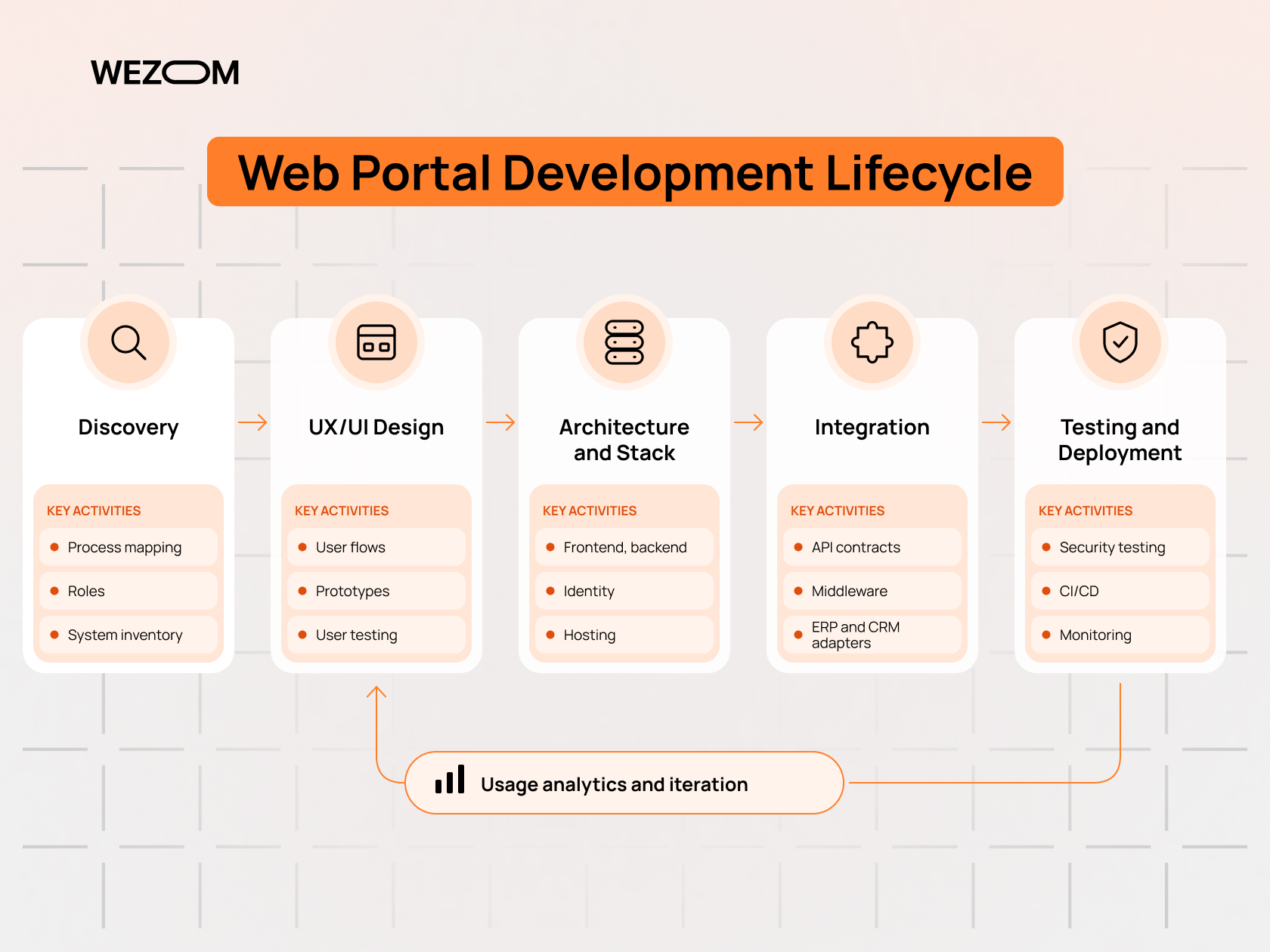
Web portal development follows a sequence in which each stage reduces uncertainty before the next one commits budget.
Business Process Discovery and Requirements Analysis
Discovery maps current processes, user groups, data sources, and pain points through interviews with sales, customer service, finance, IT, and real customers or partners. Outputs usually include role definitions, a permission matrix, workflow diagrams, an inventory of systems and their integration capabilities, and a prioritized backlog. Master data problems typically surface here.
UX/UI Design for Multiple User Roles
Design starts with each role's most frequent tasks. A buyer reordering consumables needs speed and minimal clicks; a channel manager reviewing partner performance needs filters and reports. Designers build user flows and clickable prototypes and test them with representative users.
Selecting the Technology Stack and System Architecture
Web application architecture decisions cover the frontend framework, backend platform, database, identity provider, integration approach, and hosting. Whether to build a modular monolith or microservices should follow team size and expected complexity rather than trends. Enterprise portal development also requires early decisions on tenancy, caching, and API design.
Integrating the Portal With Existing Business Systems
Integration usually runs in parallel with frontend work. Teams define API contracts, build adapters for each back-end system, and configure middleware or queues, testing against ERP and CRM sandboxes where available. Read-only features such as order history often launch before order placement, which needs stricter validation.
Security Testing, Deployment, and Ongoing Optimization
Before launch, the portal goes through functional, integration, performance, and security testing, including authorization checks for every role and penetration testing against the OWASP Top 10. Deployment uses CI/CD pipelines with automated tests and staged environments. After launch, usage analytics guide the next iterations.
How to Choose a Web Portal Development Company
A partner's grasp of business processes and integrations matters more than visual portfolio quality, because most portal risk sits behind the interface.
Assessing B2B Industry Experience and Relevant Case Studies
Useful case studies describe the business problem, the systems integrated, the user roles, and what changed after launch. Industry experience shortens discovery, because the team already understands concepts such as dealer tiers, freight terms, or broker commissions. A reference client with a portal in production for over a year shows maintenance quality.
Evaluating Technical Expertise, Security, and Integration Capabilities
Technical evaluation should cover experience with the specific ERP and CRM platforms involved, the approach to identity and authorization, integration patterns for legacy systems, testing practices, and DevOps maturity. On security, look at the secure development lifecycle, code review, dependency scanning, and familiarity with frameworks such as SOC 2, ISO 27001, or GDPR.
Questions to Ask Before Starting a Custom Portal Project
The vendor's answers to a few practical questions reveal how it handles risk and ownership:
- What does discovery produce before development starts?
- How will authorization be modeled and tested for multi-company accounts?
- What happens when a back-end system is unavailable or returns invalid data?
- Who owns the source code, infrastructure accounts, and documentation?
- What does post-launch support include, and how are response times defined?
Planning an MVP and a Scalable Development Roadmap
A portal MVP should target one user group and the few workflows that generate the most manual effort today, such as order tracking, invoice access, and reordering for existing customers. This validates integrations and adoption before further features are added. The architecture should still anticipate later tenants, languages, and roles so that growth does not force a rewrite.

FAQ
Can a web portal exist without a public-facing website?
Yes. A portal can run on its own domain with only a login page as its public surface, which is common for employee portals and supplier portals used by a closed group of vendors. For customer-facing portals, prospects still need somewhere to learn about the company, so most businesses keep a website for acquisition and link to the portal for existing accounts.
Is a web portal the same as a web application?
Every portal is a web application, but not every web application is a portal. A portal aggregates data and services from multiple systems for authenticated users and personalizes them by role. An online calculator is a web application without being a portal.
Can an existing WordPress website be converted into a B2B portal?
WordPress handles gated content and simple member areas through plugins, and some B2B commerce extensions add customer-specific pricing. For deep ERP integration, complex account hierarchies, and strict authorization, the usual approach is to keep WordPress for the public site and build the portal as a separate application linked through single sign-on and shared design elements.
How long does it typically take to develop a custom web portal?
Duration depends on the number of user roles, integrations, and workflows, the state of back-end APIs, data quality, and how quickly stakeholders make decisions. A focused MVP for one audience moves much faster than a multi-audience platform. A discovery phase produces a reliable estimate for the specific scope.
Do web portals need SEO optimization if most pages require login?
Authenticated pages should not be indexed, and search engines cannot reach them anyway. Public entry points still benefit from SEO: the login page, feature descriptions, partner application pages, and help content.
Can a B2B portal support multiple companies with separate accounts?
Yes. This is implemented through multi-tenant data modeling, where every record is tied to a company account and authorization rules filter access accordingly. Isolation must be enforced in the backend and covered by automated tests.
Is a mobile app necessary when a company already has a web portal?
A responsive portal covers most B2B use cases on phones and tablets. A native app becomes worthwhile when users need offline access, barcode scanning, push notifications, or camera-based workflows in the field, as with service technicians or warehouse staff. In those cases, the app usually consumes the same APIs as the portal.
