
Most commercial UAV programs built on open-source flight control software end up choosing between two stacks: ArduPilot and PX4. Both run on the same Pixhawk-class hardware, both speak MAVLink, and both can fly multirotors, fixed-wing aircraft, and VTOLs autonomously. They differ in architecture, licensing, tooling, and developer workflow, and those differences shape development cost, IP strategy, and long-term maintenance. This guide explains how each drone autopilot works, how it pairs with flight controller hardware, and which one fits specific commercial missions.
ArduPilot vs PX4: Key Differences at a Glance
What Is ArduPilot and How Does Its Autopilot Software Work?
ArduPilot is a community-developed autopilot suite with separate vehicle firmwares: Copter, Plane, Rover, Sub, and Blimp, plus an antenna tracker. Each firmware shares a common set of libraries for sensor drivers, navigation (the EKF3 estimator), and MAVLink communication, while vehicle-specific code handles flight modes and control. On STM32-based boards it runs on the ChibiOS real-time operating system; it also runs on Linux boards. The project is licensed under GPLv3 and supports a very broad range of hardware and peripherals.
What Is PX4 Autopilot and How Does It Control Drones?
PX4 autopilot is the flight stack hosted by the Dronecode Foundation under the Linux Foundation. It is built from independent modules (estimator, commander, navigator, position and attitude controllers) that exchange data over an internal publish-subscribe bus called uORB. On microcontroller boards it runs on NuttX. One codebase covers all airframes through configurable control allocation. PX4 uses the permissive BSD 3-Clause license, which matters to companies that want to keep firmware modifications private.
ArduPilot vs PX4 Comparison Table: Architecture, Features, and Commercial Applications
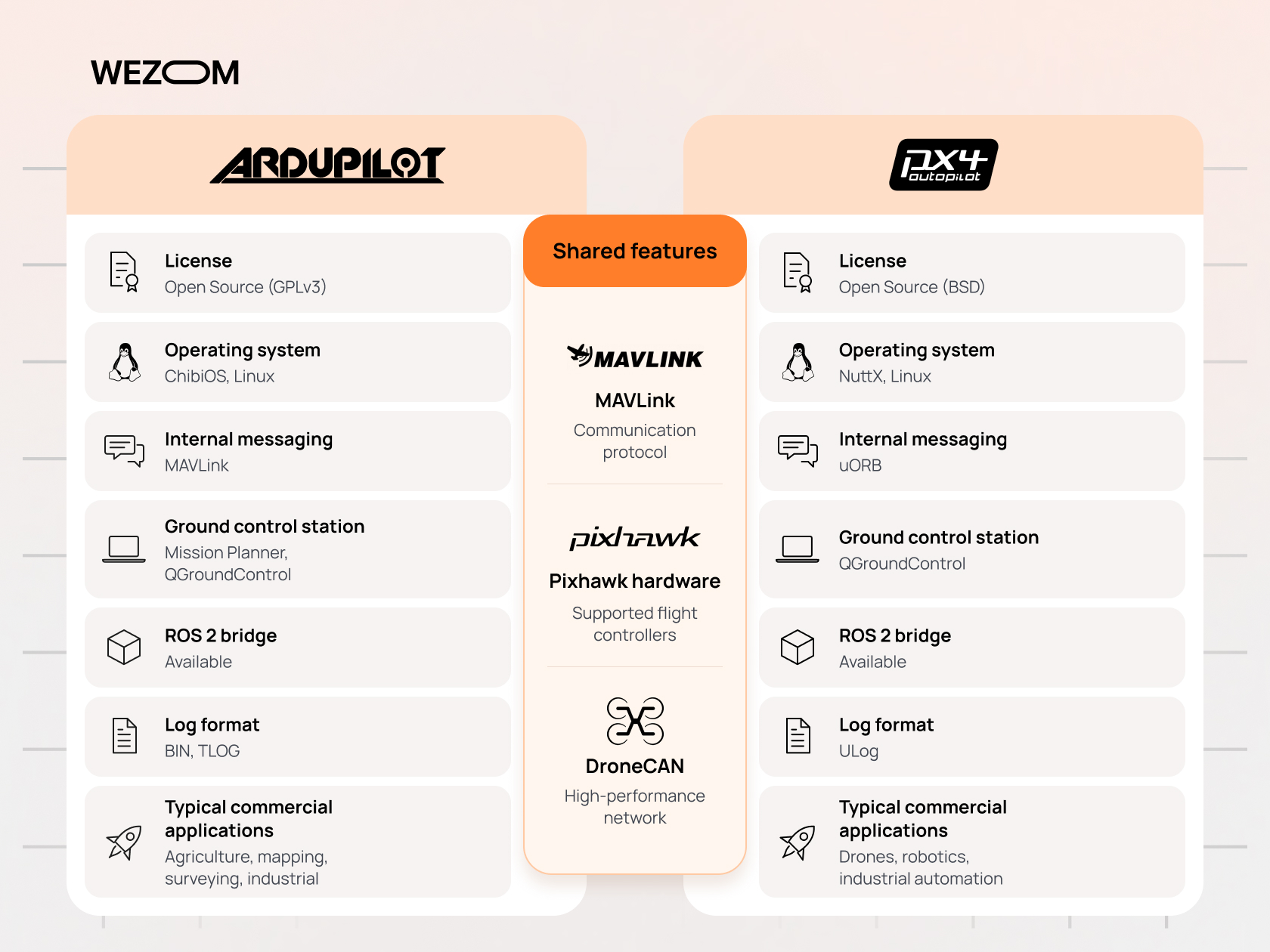
The table summarizes where the two stacks diverge for teams planning commercial UAV development. Day-to-day flight features are close, so licensing and integration model usually decide.
| Criterion | ArduPilot | PX4 |
|---|---|---|
| License | GPLv3 | BSD 3-Clause |
| RTOS on MCU boards | ChibiOS | NuttX |
| Internal messaging | Shared libraries and scheduler | uORB publish-subscribe |
| Vehicle firmware | Separate builds per vehicle type | One stack, airframe configuration |
| Primary GCS | Mission Planner (also QGroundControl) | QGroundControl |
| Scripting | Onboard Lua scripts | External via MAVSDK or ROS 2 |
| ROS 2 bridge | AP_DDS (DDS-XRCE) | uXRCE-DDS |
| Log format | DataFlash .bin | ULog (.ulg) |
How Drone Autopilot Software Works with Flight Controllers
Flight Controller Hardware vs Drone Autopilot Firmware
A drone flight controller is the physical board: processor, IMUs, barometer, power monitoring, and I/O for motors, servos, and peripherals. The autopilot firmware is the software flashed onto it, and it turns sensor readings into actuator commands. Because both stacks target the same open hardware standards, one board can usually run either, which decouples hardware purchasing from the software decision.
Core Components of an Autonomous Drone Flight Controller
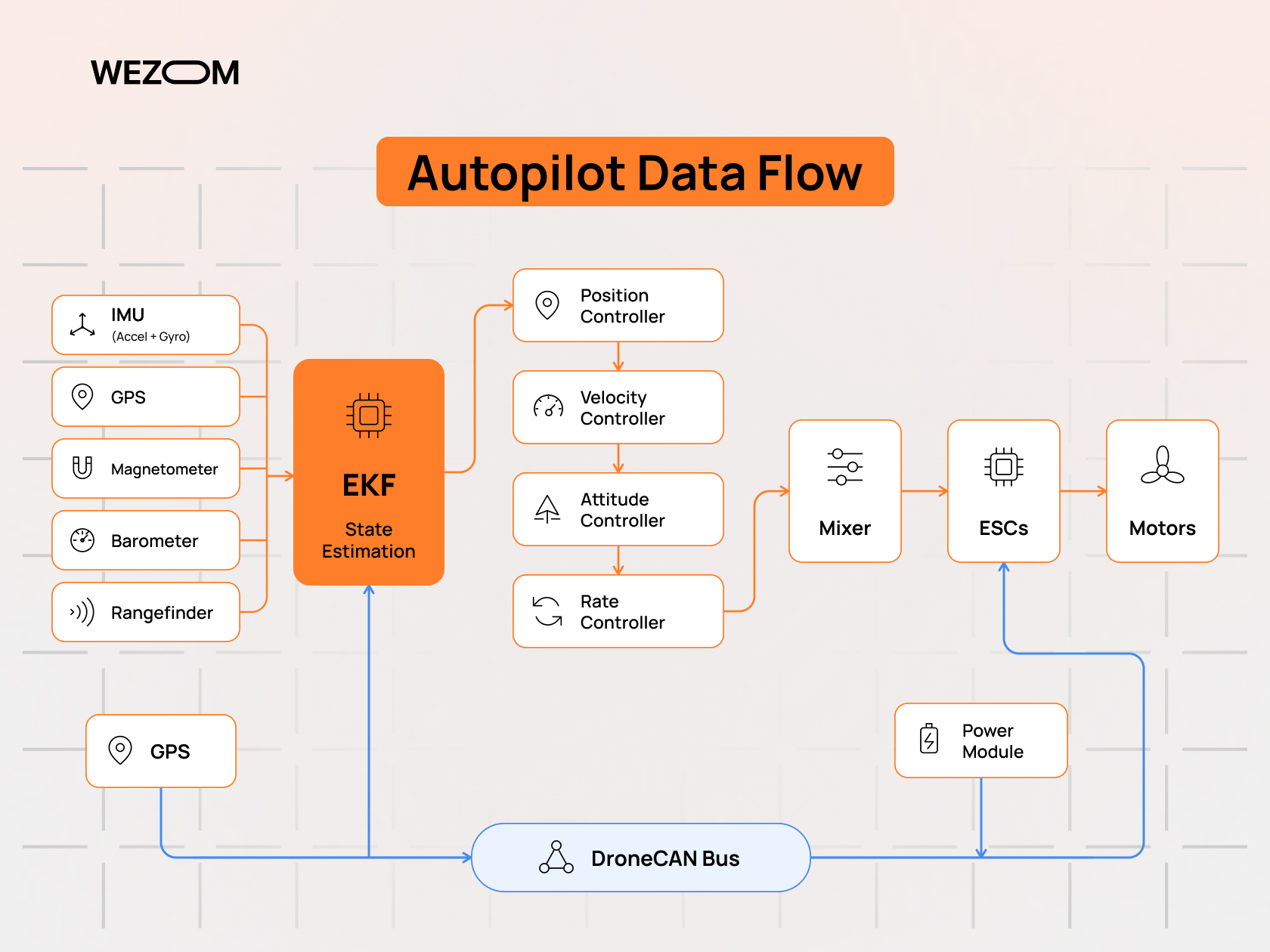
An autonomous drone flight controller combines several subsystems. The state estimator fuses inertial, GPS, magnetometer, barometer, and optional vision or rangefinder data into a position and attitude solution. Cascaded control loops (position, velocity, attitude, rate) convert navigation targets into motor or servo outputs. A mission and mode manager decides what the aircraft should be doing, while a health monitor evaluates failsafe conditions and arming checks before and during flight.
How Sensors, GPS, IMUs, and ESCs Interact with Autopilot Systems
Drone sensor integration follows a predictable loop. The IMU samples at high rates and feeds the rate controller directly, while GPS updates arrive several times per second and correct accumulated drift in the extended Kalman filter. The controller outputs are mixed into per-motor commands and sent to ESCs over PWM, DShot, or DroneCAN. DroneCAN peripherals (GPS units, ESCs, airspeed sensors, power modules) reduce wiring and report health data back to the autopilot.
The Role of MAVLink in Drone Communication and Control
The MAVLink communication protocol is the shared language between the autopilot, ground station, companion computer, and smart peripherals. It defines compact binary messages for telemetry, commands, missions, parameters, and file transfer. MAVLink 2 adds extension fields and message signing. Tools such as QGroundControl, MAVSDK, and many Remote ID modules therefore work with either autopilot, although each stack supports a slightly different command subset.
ArduPilot vs PX4 Software Architecture and Development Capabilities
ArduPilot Architecture: Flight Modes, Libraries, and Vehicle Support
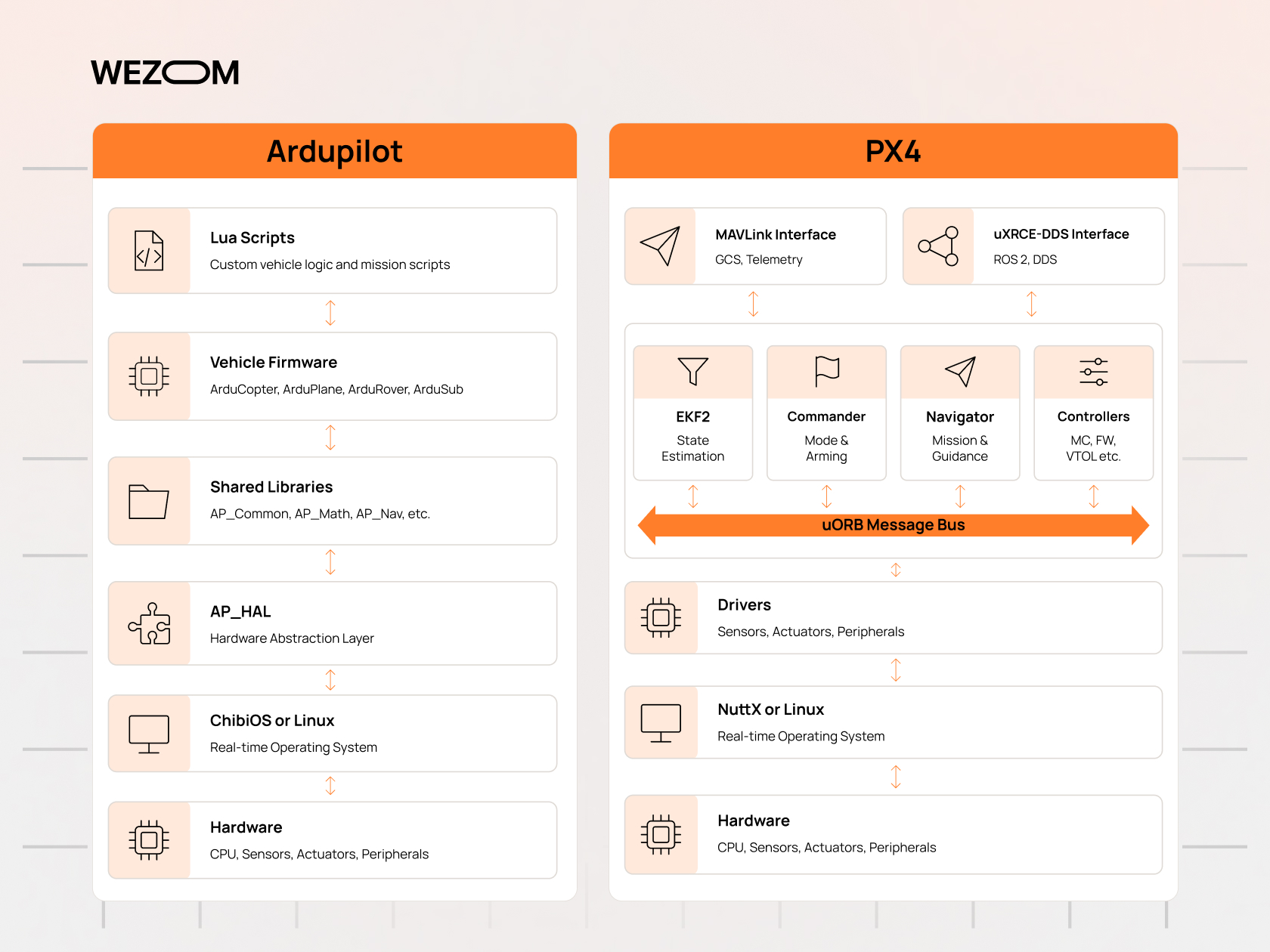
ArduPilot is organized around a hardware abstraction layer (AP_HAL) and a shared library tree that includes the scheduler, navigation, sensor drivers, and peripheral protocols. Vehicle code sits on top and defines flight modes such as Loiter, Auto, Guided, RTL, and, in Plane, QuadPlane VTOL modes. The model favors configuration through parameters: thousands of them let integrators adapt behavior without touching code. Lua scripting adds onboard logic, such as payload sequencing, without forking the firmware.
PX4 Architecture: NuttX, Modules, and uORB Messaging
PX4 runs each function as a module that subscribes to and publishes uORB topics. The EKF2 estimator publishes vehicle position; the position controller subscribes to it and publishes attitude setpoints; the commander supervises arming and failsafes. Teams can replace a single module, log any topic, or add a driver without editing unrelated code.
Custom Firmware Development and Flight Control Algorithms
UAV firmware development on either stack involves C++ and an embedded build toolchain. Teams that write custom flight control algorithms, such as a new attitude controller or estimator tuning for an unusual airframe, often find PX4 modules easier to isolate. ArduPilot suits teams whose customization fits into parameters, Lua scripts, or a new driver. The licensing consequence differs: distributed modified ArduPilot binaries carry GPLv3 source-sharing obligations, while PX4 changes can remain proprietary.
MAVSDK, ROS 2, and APIs for Autonomous Drone Development
MAVSDK provides C++, Python, and other language bindings for missions, telemetry, and offboard control. It is developed alongside PX4 and works with ArduPilot for many core functions. For ROS 2 integration, PX4 uses the uXRCE-DDS bridge to expose uORB topics as ROS 2 topics, giving high-rate access to internal state. ArduPilot provides its own DDS interface (AP_DDS), and MAVROS remains an option for both stacks.
Software Extensibility, Code Maintenance, and Developer Ecosystems
Every custom fork must be rebased onto new releases, so maintenance cost grows with divergence. ArduPilot's scripting and parameter model keeps many customizations outside the core, while PX4's modules keep changes localized. ArduPilot has a large integrator and user community with active forums; PX4 has strong ties to academia and to companies building products on Dronecode.
Pixhawk Flight Controller Compatibility: ArduPilot vs PX4
How Pixhawk Flight Controllers Support ArduPilot and PX4
Pixhawk is an open-hardware project that publishes FMU reference standards defining processors, sensors, pin mappings, and connectors. Every Pixhawk flight controller ArduPilot PX4 developers target follows these published FMU versions, from FMUv5 to the current FMUv6X and FMUv6C. PX4 treats Pixhawk standard boards as reference hardware, and ArduPilot supports the same boards, so switching stacks is a firmware reflash rather than a hardware change.
Choosing a Drone Flight Controller Board for Commercial UAVs
Commercial selection criteria go beyond the processor. Teams should check sensor redundancy, IMU temperature control and vibration isolation, connector standardization (the Pixhawk JST-GH pinouts), availability of carrier boards, supply continuity, and whether the manufacturer publishes long-term support plans. A board supported by both stacks keeps the software decision reversible.
Hardware Compatibility: Pixhawk, CubePilot, Holybro, and CUAV
Pixhawk hardware compatibility spans several manufacturers. Holybro builds the Pixhawk 6X and 6C reference boards, CUAV produces the Pixhawk V6X and its own X-series boards, and CubePilot's Cube Orange family uses a modular cube-and-carrier design popular in agricultural and industrial aircraft. Most of these boards run both ArduPilot and PX4, but driver support for specific peripherals can differ, so the complete sensor list should be validated against each stack's documentation.
Processing Power, Sensor Redundancy, and Connectivity Requirements
Current-generation boards use STM32H7 processors, which provide headroom for EKF lanes, scripting, and high-rate logging. Flight controller redundancy typically means duplicate or triplicate IMUs, dual barometers, and separate power inputs. Connectivity requirements include multiple UARTs for telemetry and Remote ID, CAN buses for DroneCAN, and, on newer boards, Ethernet for high-bandwidth companion computer links.
Flight Controller Selection for Multirotor, Fixed-Wing, and VTOL Drones
A multirotor needs enough motor outputs and responsive ESC protocols. Fixed-wing aircraft need servo outputs and an airspeed sensor input. VTOL designs combine both and benefit from more outputs and CAN-based actuators. Agricultural aircraft also need inputs for flow meters and pump control.
Mission Planner vs QGroundControl: Mission Planning and Ground Control
ArduPilot Mission Planner: Configuration, Waypoints, and Flight Monitoring
ArduPilot Mission Planner is a Windows ground control station software package that exposes nearly every ArduPilot parameter. It handles firmware installation, sensor calibration, waypoint and survey grid planning, geofence editing, real-time telemetry, and log download and analysis. Its depth suits engineers, but many ArduPilot fleets give field operators simplified GCS apps for daily work.
QGroundControl for PX4: Mission Setup and Vehicle Configuration
QGroundControl runs on Windows, macOS, Linux, Android, and iOS, and it is the primary GCS for PX4 while also supporting ArduPilot. Vehicle setup is presented as guided steps for airframe, sensors, radio, flight modes, and safety. Mission planning includes waypoints, survey patterns, structure scans, and corridor scans. Its open-source Qt codebase is frequently rebranded by OEMs as a custom operator app.
Autonomous Mission Execution, Geofencing, and Return-to-Launch
Both stacks execute uploaded missions as sequences of MAVLink mission items: navigation waypoints, loiters, camera triggers, and conditional commands. Geofences can be inclusion or exclusion polygons, circles, and altitude limits, with configurable breach actions. Return-to-launch logic supports climb-to-safe-altitude behavior and, in both stacks, rally points that allow the aircraft to land at the nearest safe location rather than at the takeoff point.
Comparing Ground Control Station Usability and Workflow Integration
For workflow integration, the key question is who operates the aircraft daily. Mission Planner suits engineering teams. QGroundControl suits mixed fleets and tablet-based field work. Commercial operators often build their own interface on MAVSDK or pymavlink so that pilots see only approved mission templates, while engineers keep a full GCS for configuration and diagnostics.
Autonomous Flight Capabilities: PX4 vs ArduPilot
Autonomous Takeoff, Landing, and Waypoint Navigation
Autonomous flight navigation is mature in both stacks. GPS waypoint navigation supports speed control, spline paths, and altitude frames relative to home, mean sea level, or terrain. Fixed-wing auto takeoff and landing include approach glide slopes and flare logic. Minor differences, such as acceptance radius handling or mission resume behavior, should be confirmed in simulation.
Obstacle Avoidance and Advanced Navigation Systems
Built-in drone obstacle avoidance relies on proximity sensors such as lidar or radar. ArduPilot offers simple avoidance that stops or slides the vehicle near obstacles, plus BendyRuler and Dijkstra path planning around fences. PX4 provides collision prevention in position mode using distance sensors. Complex 3D planning is usually handled on a companion computer, which sends adjusted setpoints to the autopilot.
Precision Landing, Terrain Following, and GPS-Denied Navigation
Precision landing systems in both stacks accept target data from IR beacons or from companion-computer vision through the LANDING_TARGET message. ArduPilot's terrain following combines a downloaded terrain database with rangefinder data, which suits low-altitude spraying and survey work. GPS-denied navigation relies on optical flow sensors or external visual odometry fed into the EKF, so the quality of the vision pipeline matters as much as the autopilot.
VTOL Transitions, Payload Control, and Complex Flight Missions
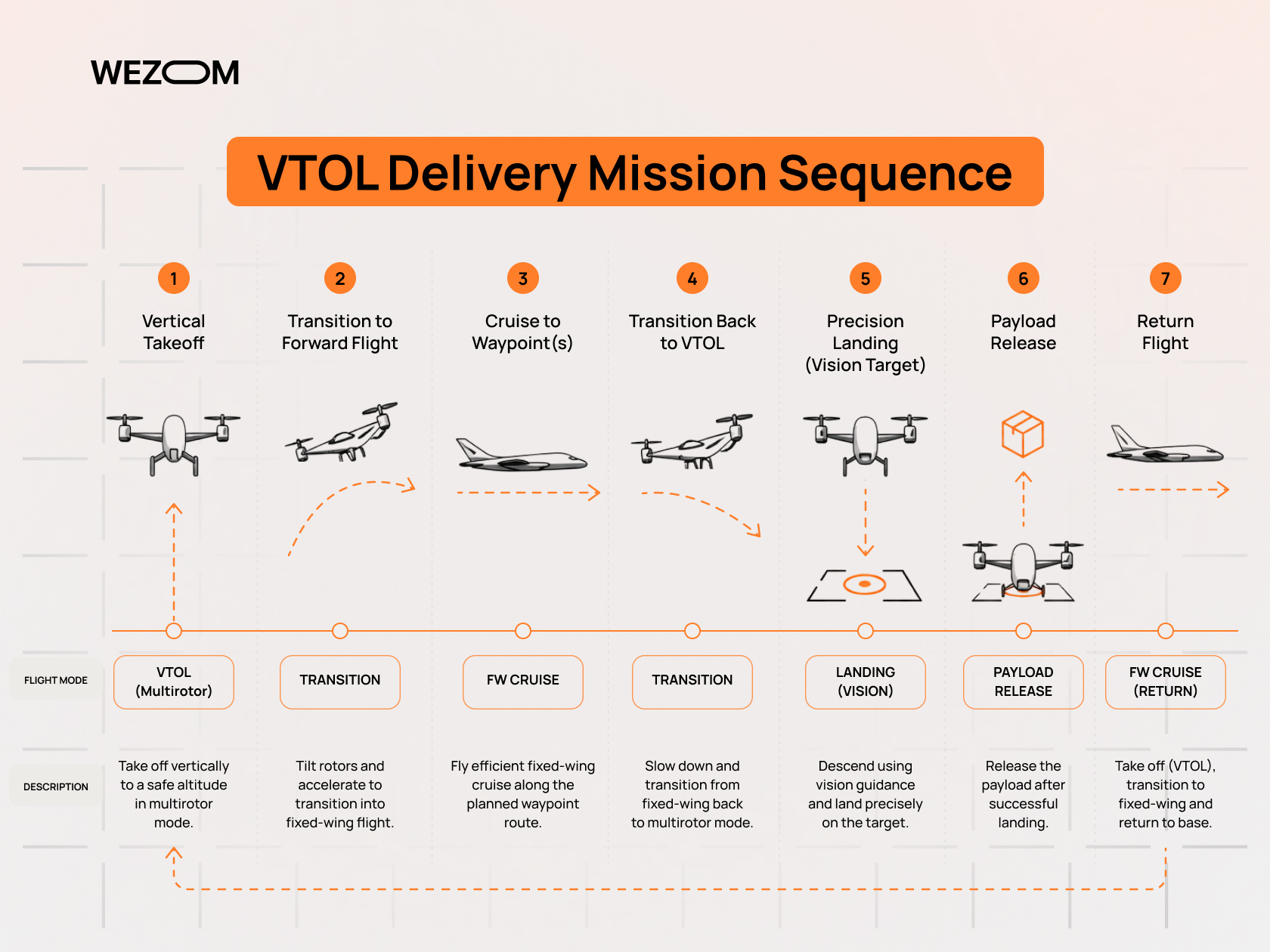
ArduPilot QuadPlane and PX4 VTOL both support tiltrotor, tailsitter, and standard (lift-plus-cruise) configurations, with automatic transitions inside missions. UAV payload integration covers camera triggering with geotagging, gimbal control through MAVLink Gimbal Protocol v2, servo-actuated drops, and winches. ArduPilot's Lua scripts are often used for custom payload sequences; PX4 integrators typically implement them in a module or on the companion computer.
Failsafe Mechanisms, Redundancy, and Operational Reliability
Autopilot failsafe mechanisms cover RC loss, data link loss, low battery, geofence breach, EKF or position estimate failure, and, in PX4, offboard signal loss. Each trigger maps to an action: hold, return, land, or flight termination. ArduPilot can switch between EKF lanes based on sensor health, and both stacks run pre-arm checks that block takeoff with faulty sensors.
Companion Computers and AI Integration for Commercial Drones
ArduPilot Companion Computer Integration with Raspberry Pi and NVIDIA Jetson
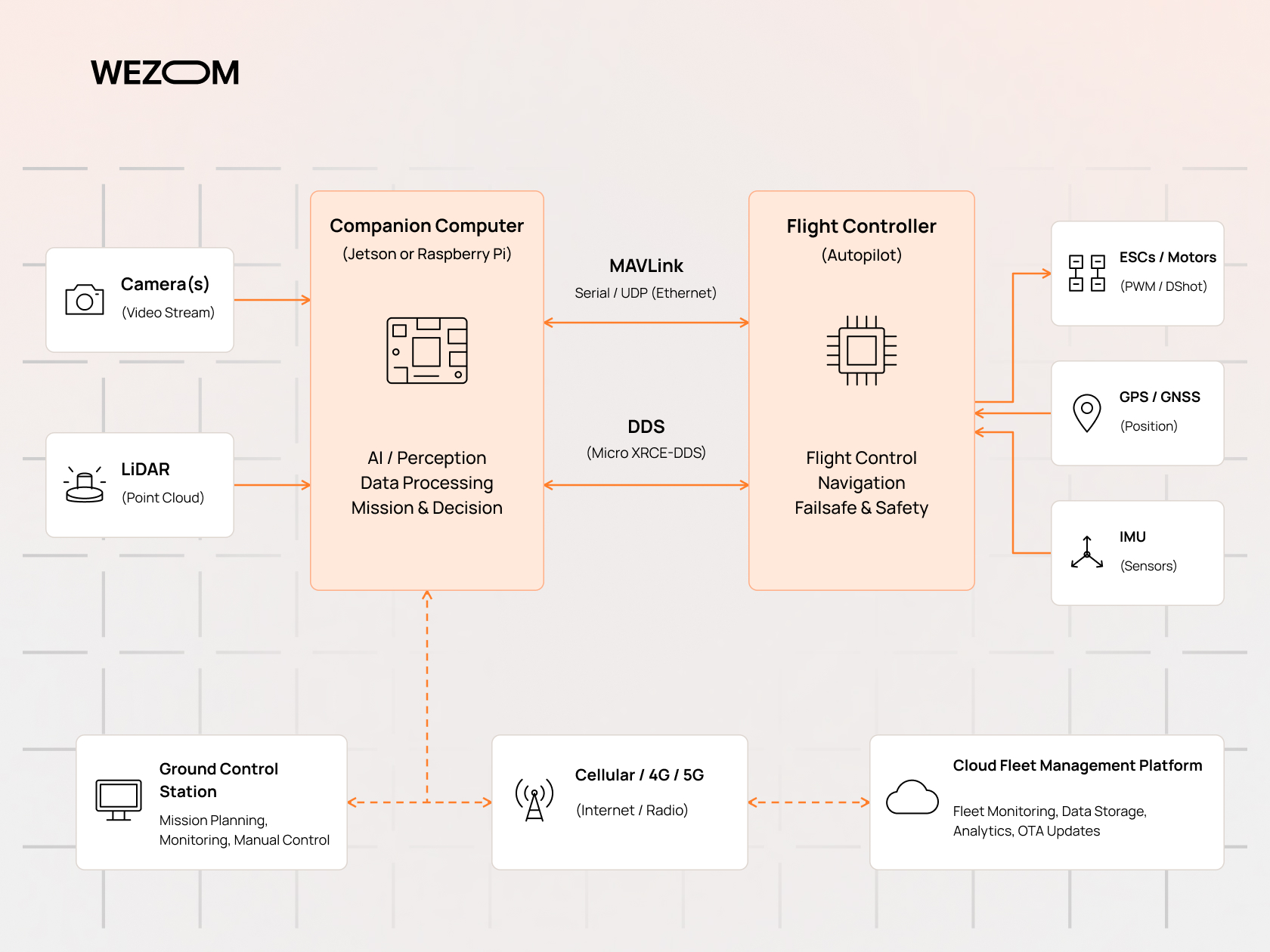
An ArduPilot companion computer, typically a Raspberry Pi or an NVIDIA Jetson module, connects over a serial port, USB, or Ethernet and exchanges MAVLink messages through MAVProxy, mavlink-router, or a DDS link. The companion handles vision, mapping, and cloud communication, and sends commands in Guided mode.
PX4 Offboard Control and Companion Computer Communication
PX4 offboard control lets an external computer stream position, velocity, attitude, or rate setpoints. PX4 requires a continuous setpoint stream before entering offboard mode and triggers a failsafe if the stream stops. Communication runs over MAVLink via MAVSDK or over uXRCE-DDS with ROS 2, the latter giving companion software direct access to internal uORB topics.
Computer Vision, Object Detection, and AI-Assisted Navigation
AI-powered drone navigation runs on the companion, not the flight controller. A detection model identifies objects such as crop rows, power line insulators, or landing pads, and the companion converts results into setpoints, landing targets, or mission changes. Keeping AI outside the autopilot means a crashed vision process cannot halt flight control, provided failsafes handle lost companion input.
Edge Computing and Real-Time Data Processing for UAV Operations
Edge processing reduces the amount of data sent over limited links. A thermal inspection drone might flag anomalies onboard and transmit only coordinates and image crops, while full datasets stay on local storage. The companion must also deliver setpoints faster than the autopilot's timeout, so pipeline latency must be predictable.
Connecting Drone Autopilot Software to Cloud and Fleet Management Systems
Drone fleet management platforms connect through the companion or a cellular modem, relaying MAVLink telemetry to cloud services. Typical integration covers mission dispatch, live tracking, log upload, and maintenance records. Drone telemetry systems for fleets should handle intermittent connectivity by buffering data locally, and the aircraft must complete missions safely when the cloud link drops.
Flight Logs, Testing, and Performance Optimization
ArduPilot Log Viewer and Mission Planner Flight Data Analysis
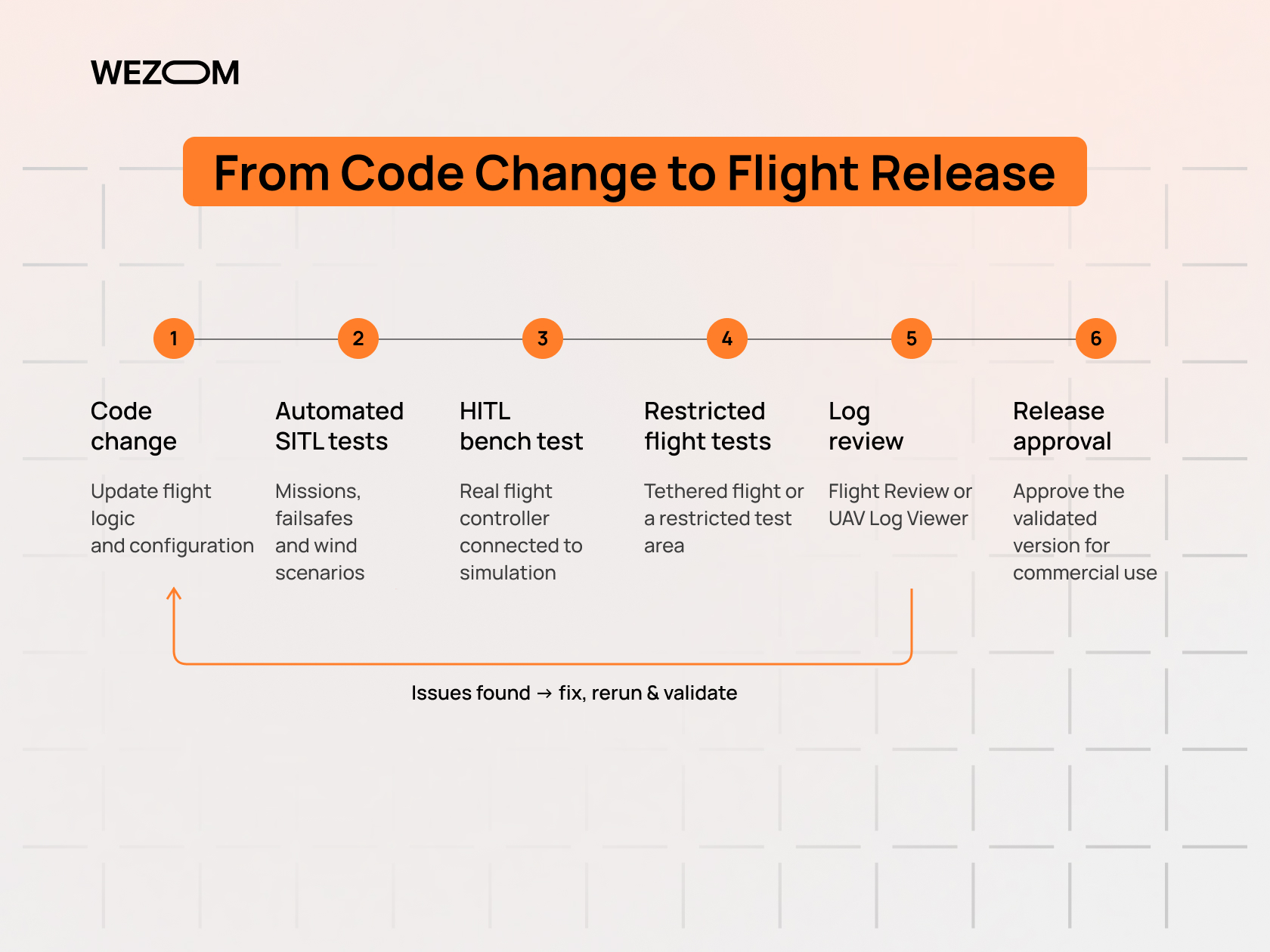
ArduPilot writes DataFlash .bin logs to the SD card and telemetry logs (.tlog) on the ground station. Mission Planner can graph any logged field and run automated log checks. UAV Log Viewer, the browser-based ArduPilot log viewer, plots parameters and 3D flight paths without installing software, and MAVExplorer supports scripted analysis.
PX4 Flight Review and ULog Analysis
PX4 records ULog files that can log any uORB topic. Flight Review, available online or self-hosted, generates standard plots for tracking performance, vibration, estimator status, and battery behavior. PlotJuggler and the pyulog library support deeper real-time flight data analysis and automated processing across many flights.
PID Tuning, Vibration Analysis, and Flight Performance Diagnostics
PID tuning affects stability, energy use, and payload data quality. ArduPilot offers AutoTune for multirotors and fixed-wing aircraft, and PX4 provides an autotuning feature for rate and attitude controllers. Flight log diagnostics should start with vibration: high accelerometer noise or clipping causes estimator errors that no tuning will fix. Both stacks include notch filters driven by RPM or FFT analysis to suppress motor noise.
Software-in-the-Loop (SITL) and Hardware-in-the-Loop (HITL) Simulation
SITL and HITL simulation reduces flight test risk. ArduPilot SITL runs the real firmware on a PC with built-in physics or connects to Gazebo and other simulators. PX4 SITL typically pairs with Gazebo. In HITL, the actual flight controller runs the firmware while the simulator supplies sensor data, validating timing and hardware-specific behavior.
Testing Autopilot Reliability Before Commercial Deployment
A deployment-ready test plan includes failsafe tests for every configured trigger, mission repetition across wind conditions, payload weight variations, and long-duration endurance runs. Release candidates should be pinned to specific firmware versions and parameter files, with regression tests run in SITL for every update.
ArduPilot vs PX4 vs Betaflight vs INAV: Which Flight Controller Software Fits Your Drone?
Betaflight vs ArduPilot for FPV and Autonomous Missions
Betaflight is drone flight controller software optimized for manually flown FPV quads, with very low-latency rate control and filtering. The Betaflight vs ArduPilot comparison is mostly about mission type: Betaflight offers GPS Rescue but no waypoint missions, while ArduPilot provides full autonomous capability at the cost of more complex setup.
INAV vs ArduPilot for GPS Navigation and Fixed-Wing Aircraft
INAV adds GPS navigation, waypoint missions, and fixed-wing support on small, affordable boards. The INAV vs ArduPilot decision usually comes down to scale: INAV works well for lightweight hobby and small professional aircraft, while ArduPilot offers stronger redundancy, DroneCAN support, companion integration, and the configurability commercial operations need.
PX4 vs ArduPilot for Robotics Research and Commercial Development
For robotics research, PX4 benefits from ROS 2 integration and modular code. The PX4 vs ArduPilot choice for products often depends on licensing: BSD permits proprietary firmware, while GPLv3 suits teams that keep proprietary logic on companion computers or in scripts.
When a Dedicated FPV Drone Flight Controller Is the Better Choice
A dedicated FPV board running Betaflight fits when the aircraft is always manually piloted, latency matters more than autonomy, and weight and cost must be minimal. Training drones and cinematic FPV aircraft are typical examples.
Commercial Drone Use Cases: When to Choose ArduPilot or PX4
Surveying, Mapping, and Photogrammetry Drones
Survey aircraft need accurate camera triggering, geotagging, RTK GPS, and terrain-aware grid missions. Both stacks handle this well; ArduPilot is common on fixed-wing mapping aircraft and with Mission Planner survey tools, while PX4 fits OEM platforms with custom apps.
Agricultural UAVs and Precision Spraying Systems
Spraying drones need terrain following, flow-rate control tied to ground speed, and dependable behavior at low altitude. ArduPilot provides a built-in sprayer library and terrain support, which explains its wide use in agricultural airframes.
Industrial Inspection, Thermal Imaging, and Infrastructure Monitoring
Inspection relies on stable position hold, gimbal control, obstacle sensing, and companion-based analysis. Industrial drone automation for inspection often favors PX4 with ROS 2 when custom perception is central, and ArduPilot when diverse sensor hardware must be supported.
Drone Delivery, Logistics, and Autonomous VTOL Operations
Delivery requires VTOL efficiency, precision landing, payload release, and BVLOS flight operations. Both stacks support these functions; selection depends on the certification strategy, the C2 link architecture, and whether the firmware must remain proprietary.
Drone-in-a-Box Systems and Remote Fleet Operations
Docking systems need precision landing on a station, automated battery handling, and remote operation without a pilot on site. The autopilot must expose reliable APIs for remote dispatch and health reporting, which makes MAVSDK and fleet integration quality central to commercial drone scalability.
How to Choose the Right Drone Autopilot for Your Commercial UAV Project
Match Autopilot Capabilities to Aircraft Type and Mission Requirements
Start with the airframe and mission profile. Marine, rover, or unusual airframes often point to ArduPilot. Products that depend on custom estimators or ROS 2 autonomy often point to PX4. When both fit, team experience becomes the deciding factor.
Evaluate Hardware Compatibility and Integration Complexity
List every peripheral (GPS, ESCs, rangefinders, gimbals, Remote ID module) and confirm driver support in the chosen stack. An ArduPilot flight controller build may support a niche sensor out of the box that requires driver work in PX4, or the reverse.
Compare Development Costs, Support, and Long-Term Maintenance
Costs come from custom software development, testing, and tracking upstream releases, not licenses. Autopilot firmware licensing determines whether modifications must be published. Teams should plan release cycles, regression testing, and access to engineering support.
Assess Cybersecurity, Safety Requirements, and Regulatory Compliance
Drone cybersecurity covers MAVLink signing, encrypted links, secure boot, and protected parameter access. ArduPilot supports secure bootloaders that accept only signed firmware. Drone flight safety also depends on Remote ID integration, documented failsafe behavior, and evidence for regulators.
Build a Proof of Concept Before Scaling Drone Production
A proof of concept should fly the actual mission profile in SITL, then on prototype hardware, with full logging. Comparing both stacks on the same airframe exposes integration effort early.

FAQ
Can ArduPilot and PX4 run on the same Pixhawk flight controller?
Yes, though not simultaneously. Most Pixhawk-standard boards accept either firmware through QGroundControl or Mission Planner. Parameters do not transfer between stacks, so recalibration and reconfiguration are required after switching.
Is ArduPilot or PX4 easier to learn for beginner drone developers?
ArduPilot is often easier for integrators because most behavior is configurable through parameters and documentation is extensive. PX4 can be easier for software developers familiar with modular C++ and ROS 2.
Can you switch from ArduPilot to PX4 without replacing the flight controller?
Usually yes, if the board is supported by both stacks. Teams must verify peripheral drivers, rebuild parameter sets, retune controllers, and re-test failsafes, which is effectively a new integration cycle.
Are ArduPilot and PX4 free to use in commercial drone products?
Both are free. ArduPilot's GPLv3 requires providing source code for modified firmware that is distributed. PX4's BSD license allows proprietary modifications with attribution. Legal review is advisable before shipping a product.
Which autopilot is better for drones operating without a constant internet connection?
Neither requires internet access. Both execute uploaded missions and failsafes onboard. Internet matters only for fleet platforms, live streaming, and map downloads, which should be cached before flight.
Can ArduPilot or PX4 work with custom-built drone flight controller boards?
Yes. ArduPilot uses hardware definition files for new STM32 boards, and PX4 uses board configuration directories. Following Pixhawk pin mappings reduces porting work and simplifies long-term support.
Do ArduPilot and PX4 support Remote ID and BVLOS operations?
ArduPilot supports OpenDroneID modules from version 4.2 via MAVLink or DroneCAN. PX4 Remote ID support is still marked experimental in its documentation. BVLOS approval depends on regulators, detect-and-avoid, and C2 links, not the autopilot alone.
How often should commercial drone autopilot firmware be updated?
Update on a controlled schedule rather than with every release. Monitor stable releases and security fixes, validate in SITL and test flights, and deploy fleet-wide only after regression testing passes.
