
A drone that lives on site, launches on a schedule, and returns to charge without anyone driving out to fly it changes the economics of aerial data collection. The dock and aircraft are only as useful as the software that schedules missions, authorizes takeoff, streams video to remote operators, and pushes results into enterprise systems. This article explains how drone-in-a-box software is structured, how dock management and automation work, where DJI's ecosystem fits, and what to evaluate before choosing a platform or a custom build.
What Is a Drone-in-a-Box System and How Does It Work?
A drone in a box system is an aircraft based permanently or semi-permanently where it operates, inside an enclosure that protects, charges, and launches it on command. The terms "drone dock" and "drone in a box" are often used interchangeably, yet the dock is only the ground station; the complete system also includes the aircraft, communications, mission software, and data platform.
Key components of a drone-in-a-box solution
In a typical drone in a box solution, the aircraft carries an RGB zoom, thermal, or mapping payload. The drone docking station shelters the aircraft, conditions its climate, and restores energy by contact charging or robotic battery swapping. A communications layer links the dock to the operations center over fiber, LTE/5G, or satellite. Mission-control software handles scheduling and fleet management, a data platform stores imagery and telemetry, and human operators supervise flights and remain accountable for compliance.
How autonomous drones, docking stations, and software work together
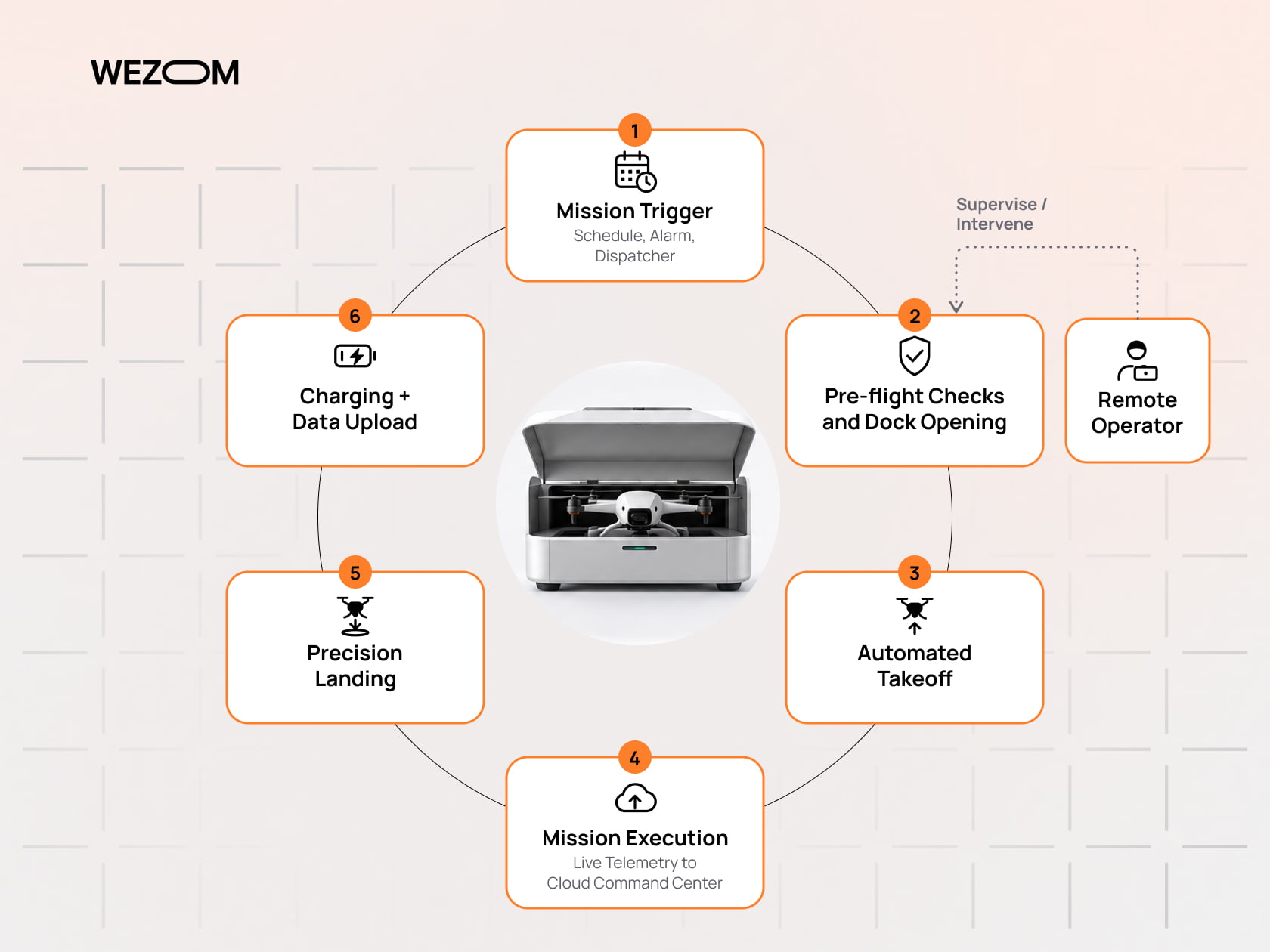
Each mission is a closed loop. A trigger arrives, such as a scheduled patrol, an intrusion alert, or a dispatcher request. The software checks dock and aircraft health, wind, precipitation, and airspace, then opens the cover and releases the aircraft. The drone flies its route while streaming telemetry, returns, lands on the pad, and charges while media uploads. Most deployments are automated rather than fully autonomous, with a remote pilot supervising.
Drone-in-a-box vs traditional UAV operations
Traditional operations depend on a pilot traveling to the site with batteries, a controller, and the aircraft. A drone with docking station removes travel, so a substation can be inspected daily or an alarm verified within minutes. The trade-offs are real: a dock serves one site and usually one aircraft type, payload changes require a visit, and the operator must invest in power, connectivity, and maintenance. Docks suit repeatable missions at fixed locations.
Drone-in-a-Box Software Architecture and Core Components
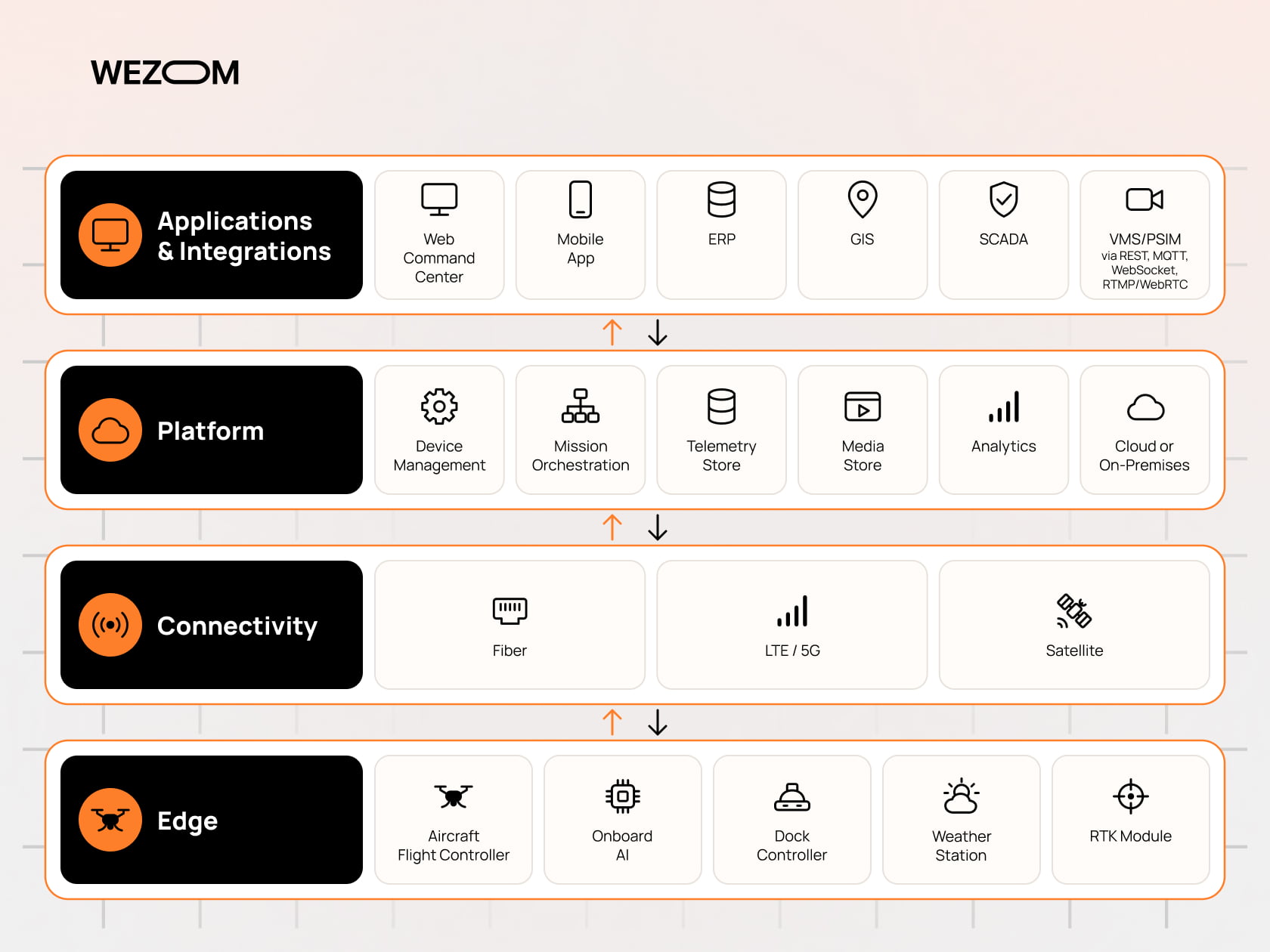
The stack spans firmware and edge logic on the aircraft and dock, a control and data platform in the cloud or a private data center, the user-facing command center, and integration services connecting it all to enterprise systems.
Cloud-based and on-premises drone management platforms
Cloud-hosted drone fleet management software is the fastest start, with no servers to run. Utilities, critical-infrastructure operators, defense contractors, and public agencies often need on-premises or private-cloud deployment because imagery of protected sites cannot leave their network or jurisdiction. On-premises platforms shift availability, patching, backups, and certificate management to the customer.
Flight control software, mission orchestration, and ground control systems
The flight controller on the aircraft stabilizes the airframe and executes waypoints. Drone ground control software translates plans into commands, monitors the link, and supports manual control. Mission orchestration sits above both, deciding which dock flies which task, when, and under what conditions. In a docked system orchestration replaces much of a field pilot's judgment, so its rules for weather limits, battery thresholds, and abort conditions must be explicit and auditable.
Edge computing and real-time data processing
Edge computing for drones moves processing onto the aircraft or into the dock. Onboard compute can run object detection on video so that only relevant frames, alerts, or coordinates travel over a constrained link, while the dock caches full-resolution media and uploads it after landing. The design question is which decisions must happen at the edge in real time, such as intrusion detection, and which can wait for heavier cloud analytics.
APIs, SDKs, and integrations with enterprise infrastructure
Manufacturer APIs and SDKs typically expose device status, telemetry, media, mission creation, and live streams. Drone dock API integration connects these to a security platform that triggers flights, an asset system that receives findings, or a GIS that displays coverage. Common protocols include REST for configuration, MQTT or WebSocket for telemetry and events, and RTMP, RTSP, or WebRTC for video. Vendor firmware updates can change payloads, so versioning deserves early attention.
Drone Docking Station Software and Autonomous Dock Management
Dock software is the embedded and supervisory logic that keeps the enclosure safe and the aircraft ready.
How an autonomous drone docking station operates
An autonomous drone docking station is essentially a small industrial controller managing cover motors, the landing pad, charging contacts or a battery-swap robot, climate control, and a weather station. Between flights it holds the aircraft at a safe temperature and charge, reports status to the platform, and refuses launch commands when conditions are unsafe.
Precision landing, RTK positioning, and automated docking
Drone precision landing makes the box possible. Standard GNSS accuracy of a few meters cannot reliably hit a pad barely larger than the aircraft, so docks use RTK corrections for centimeter-level positioning, with vision-based guidance from pad markers taking over on final approach. Automated takeoff and landing logic also defines fallbacks: if RTK fix is lost or the marker is not detected, the aircraft hovers and retries, diverts to an alternate dock, or lands at a predefined safe point.
Autonomous drone charging station and battery management software
Energy turnaround determines missions per day. An autonomous drone charging station restores the battery through contacts and thermal management; DJI publishes 27 minutes from 15% to 95% at 25 °C for Dock 3, and cold weather extends this because the battery must warm first. Battery-swap docks replace packs in minutes at the cost of more moving parts and a battery inventory. Drone charging automation software tracks cycle counts and cell health, retires degraded packs, and schedules missions around actual battery state rather than nominal flight time.
Environmental monitoring, weather sensors, and dock safety checks
Docks carry anemometers, rain sensors, and temperature and humidity probes. Software compares readings with configured limits before every launch and during flight, recalling the aircraft if conditions deteriorate. Checks also cover the cover mechanism, pad obstructions such as snow or debris, internal temperature, and power supply. Logging every refused launch separates weather downtime from equipment faults.
Remote diagnostics, firmware updates, and predictive maintenance
With nobody on site, the platform must expose motor currents, fan speeds, charging anomalies, and error codes remotely. Firmware for the dock, aircraft, and payload should be staged on one unit first, rolled out in maintenance windows, and reversible. Drone dock predictive maintenance uses this telemetry to flag rising cover-motor current or slowing charge rates before a mission is missed.
Drone-in-a-Box Automation: From Mission Planning to Autonomous Flights
Drone docking automation covers everything between "a task exists" and "results are available," and it is where most operational value and risk sit.
Automated mission scheduling and waypoint navigation
Drone mission planning software lets operators build waypoint inspections with fixed camera angles, mapping grids, and corridor flights along pipelines or fences. Automated drone missions are then attached to schedules with rules for weather, daylight, and battery. Identical viewpoints on every flight make automated change detection possible.
Pre-flight checks, takeoff authorization, and flight execution
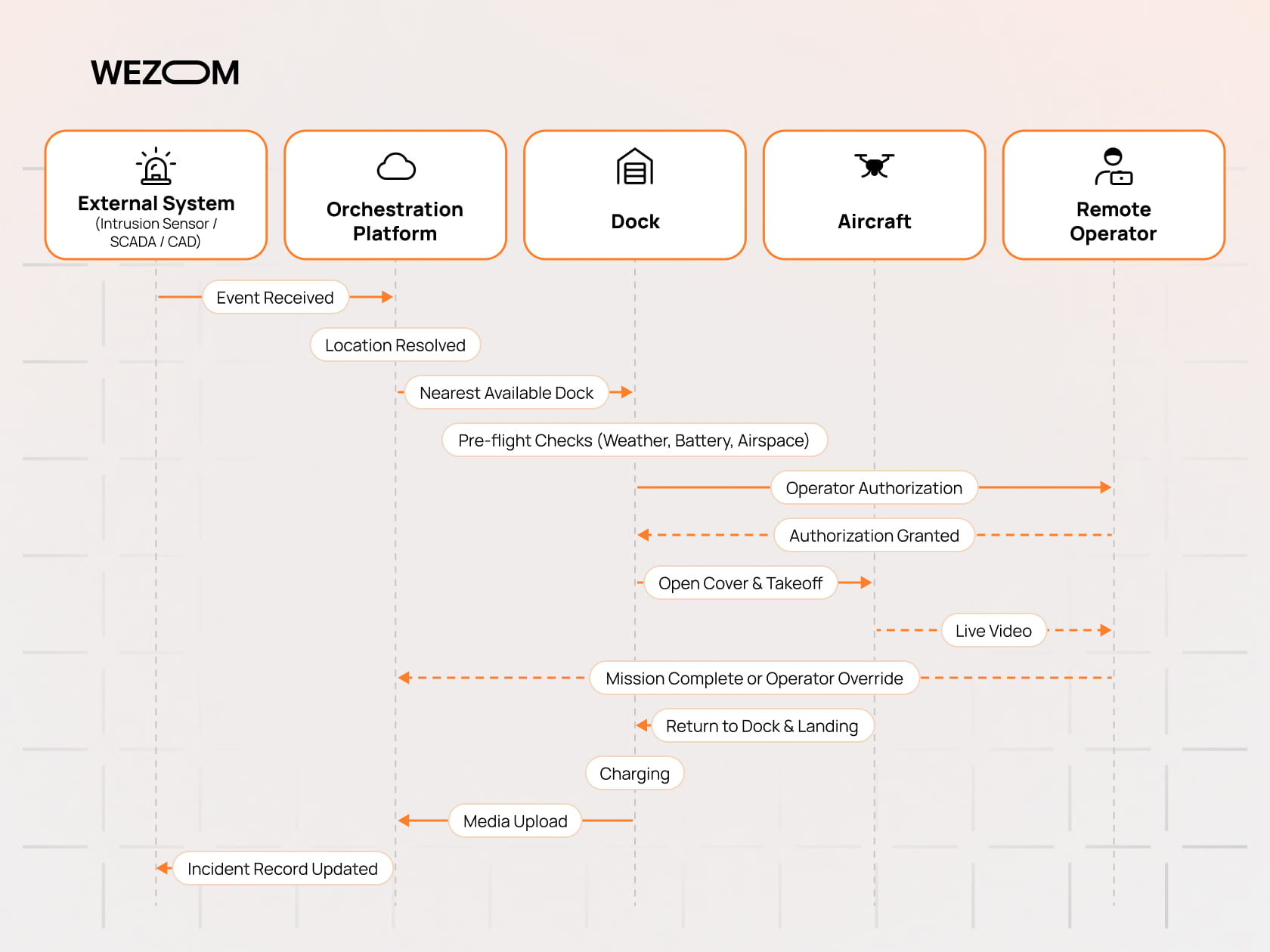
Before launch, the system performs what a field pilot would: aircraft self-test, battery level and temperature, GNSS and RTK fix, link quality, weather limits, geofences, airspace restrictions, and conflicts with other aircraft. Some organizations require human authorization for each takeoff; others allow automatic launch on pre-approved routes within approved conditions.
Automated return-to-dock and landing procedures
Return-to-dock triggers when a mission ends, battery reserve reaches a calculated threshold, weather limits are exceeded, or the link is lost. Reserves should reflect distance, headwind, and temperature. If the dock reports a fault, such as a cover that will not open, the aircraft needs an alternate: another dock, an emergency landing zone, or a controlled hover until an operator decides.
Event-triggered drone missions and emergency dispatch
Event-triggered missions respond to other systems: a perimeter sensor, a fire alarm, a SCADA pressure alarm, or a 911 computer-aided dispatch (CAD) record. The integration converts the event into a target location, selects the nearest available dock with a suitable payload and charge, and creates the flight. Latency should be measured end to end.
Multi-drone coordination and autonomous fleet scheduling
With several docks, multi-drone coordination becomes a scheduling problem: assigning tasks by location, availability, payload, battery, and priority while preventing route conflicts. Autonomous drone fleet management also handles preemption, letting an emergency task interrupt a routine patrol and rescheduling the patrol afterward. UAV fleet orchestration needs clear priority classes so operators understand why a given aircraft was assigned.
Remote Drone Operations and Centralized Fleet Management
Remote drone operations move the pilot from the field to a command center.
Remote drone control through a web-based command center
The command center is usually a browser application showing a map of docks and aircraft, their status, active missions, and alerts. An operator can start a mission, take manual control, steer the gimbal, or send the aircraft to a point on the map. Drone command and control through a browser requires low latency and a rule that only one operator holds control at a time.
Live video streaming, telemetry, and remote payload management
Live streaming gives security staff, inspectors, or incident commanders the aircraft's view, often with RGB and thermal side by side. UAV telemetry monitoring adds altitude, speed, position, battery, signal strength, and wind. Payload controls cover zoom, thermal palettes, laser range finder readings, and accessories such as spotlights or speakers.
Managing multiple drone docks across different locations
Scaling to dozens of sites creates a configuration problem. Each dock needs geofences, approved routes, weather limits, maintenance schedules, and permissions, which should be managed through templates rather than per-device settings. Drone remote monitoring dashboards should show uptime, mission success rates, refused launches by reason, and pending maintenance.
Operator intervention, emergency overrides, and fail-safe mechanisms
The command center should offer immediate pause, return-to-dock, land-in-place, and manual takeover. Fail-safes must be predefined for link loss, GNSS degradation, low battery, motor fault, and geofence breach, with actions depending on flight phase. Operators also need training on when not to intervene, since a manual takeover during precision landing can create more risk than letting the automated sequence finish.
Flight logs, operational analytics, and automated reporting
Every flight should produce a log of route, telemetry, events, operator actions, and media references. Analytics turn logs into fleet metrics such as turnaround time, weather downtime, battery trends, and alert-to-launch time. Automated reporting pushes inspection summaries, annotated images, or orthomosaics to stakeholders who never open the drone platform.
DJI Drone Dock Integration and Drone-in-a-Box Software Ecosystem
Many enterprise dock projects start with DJI hardware, so the main decision is how much of DJI's software stack to adopt.
DJI drone-in-a-box solutions and docking station capabilities
The DJI drone in a box family pairs each dock generation with a dedicated aircraft: Dock 1 with the Matrice 30 series, Dock 2 with the Matrice 3D and 3TD, and Dock 3 with the Matrice 4D and 4TD. Each DJI drone dock includes RTK positioning, a weather station, climate control, and a site camera, and connects either to DJI FlightHub 2 or to third-party platforms through DJI Cloud API.
DJI Dock 2, DJI Dock 3, and compatible enterprise drones
Dock 2 supports the Matrice 3D and 3TD (the latter adding thermal), with IP55 protection and a published 32-minute charge from 20% to 90%. Dock 3, launched in early 2025, supports the Matrice 4D and 4TD, is rated IP56, operates from −30 °C to 50 °C, tolerates higher landing wind, and charges faster. It is DJI's first dock designed for vehicle mounting. DJI specifies up to 54 minutes of flight for the Matrice 4D series; the 4TD adds thermal imaging and near-infrared illumination. Aircraft are not interchangeable between generations.
DJI FlightHub 2 for autonomous missions and remote operations
DJI FlightHub 2 is DJI's fleet and mission platform. It provides waypoint, mapping, and linear route planning, task scheduling, live streaming, remote control of docked aircraft, annotations, media management, and team permissions, in cloud and on-premises editions. For DJI-only fleets focused on scheduled inspection and monitoring, it can cover most needs without custom development.
Integrating DJI drone dock systems through Cloud API and SDKs
DJI Cloud API lets docks and DJI Pilot 2 connect to a third-party server instead of FlightHub 2. It uses MQTT for device messaging, HTTPS for services, and WebSocket for pushing data to web clients, built around a "thing model" of device properties, services, and events. A custom platform can then receive telemetry, issue flight tasks, manage media, control streams, and push firmware. A Cloud API project involves broker setup, device binding, media storage, and tracking protocol changes across firmware versions.
When to use DJI's native platform vs custom drone-in-a-box software
FlightHub 2 usually fits when the fleet is DJI-only, workflows are standard, and data can live in DJI's environment or its on-premises edition. Custom software on Cloud API makes sense when drone operations must live inside an existing security operations center, utility asset system, or CAD; when the fleet mixes manufacturers; when data sovereignty excludes the vendor environment; or when specialized analytics are required.
Vehicle-Mounted Drone Dock and Mobile Deployment Software
A vehicle mounted drone dock brings docked operations to sites that do not justify permanent infrastructure.
How a vehicle-mounted drone dock differs from a fixed installation
A fixed dock is surveyed once and has stable power, network, and position. A mobile dock changes location, heading, and often connectivity with every deployment. Software must treat position as dynamic, revalidate geofences and routes at each stop, and account for vibration and stabilization during transit.
Dynamic positioning, dock calibration, and mobile mission planning
After the vehicle stops, the dock must establish precise position and heading before the aircraft can return to it, usually through a fresh RTK fix and calibration (DJI handles this through FlightHub 2 for Dock 3). Mission plans become relative templates placed around the vehicle's current position, with automatic airspace checks at each new site.
Connectivity, power management, and operational limitations
Cellular coverage varies along routes and at remote incident sites, so mobile setups often add bonded LTE routers, satellite terminals, or relays. Charging and climate control draw on the vehicle's electrical system or an auxiliary battery. Authorizations for one location may not cover the next.
Use cases for mobile drone docking systems
Mobile docks fit pipeline and power line patrols, wildfire and flood response, event security, highway incidents, convoy overwatch, and short construction projects. A utility crew can drive to a storm-damaged line section, launch a damage assessment flight, and move on while the aircraft charges in transit.
Drone-in-a-Box Software for Enterprise Applications
Enterprise drone automation pays off when flight data is tied to a specific operational decision.
Automated infrastructure and industrial asset inspections
Drone infrastructure inspection is the most common docked use case: substations, tanks, flare stacks, bridges, towers, and plants. Repeated flights from identical viewpoints let analytics detect corrosion, leaks, hot spots, or structural change. Remote drone inspection only changes outcomes when findings reach maintenance work orders.
Perimeter security and continuous aerial surveillance
Automated aerial surveillance combines scheduled patrols with alarm verification. When a fence sensor or video analytics flags an intrusion, the dock launches to the coordinates and the operator gets an aerial view, typically thermal at night.
Drone as First Responder (DFR) and public safety operations
In drone as first responder programs, agencies dispatch docked aircraft to qualifying 911 calls so commanders see live video before units arrive. The software integrates with CAD, selects the nearest dock, and streams to responders' devices. These programs generally need BVLOS authorization and clear policies on recording and retention.
Energy, utilities, and renewable infrastructure monitoring
Solar operators run thermal scans to locate defective strings, wind sites inspect blades, and transmission operators patrol rights-of-way for vegetation encroachment. Linking findings to SCADA and asset management ties each anomaly to an asset ID and lets grid alarms trigger verification flights.
Construction site monitoring, surveying, and progress tracking
A site dock can fly scheduled mapping missions, producing orthomosaics, point clouds, and stockpile volumes that are compared against design models and schedules. The software needs a pipeline to photogrammetry processing and connections to BIM or project management tools.
Agriculture and environmental monitoring with autonomous drones
Autonomous UAV systems can monitor crop health, irrigation, erosion, water levels, or wildlife without dispatching staff. Coverage is limited to a radius around each dock, and multispectral payloads often require aircraft that current docks do not support.
Safety, Cybersecurity, and Regulatory Compliance for Autonomous Drone Operations
Autonomous drone operations raise the bar for safety cases and security controls.
BVLOS operations and regulatory requirements for remote drone missions
An automated launch does not make a flight legal beyond visual line of sight. In the US, most docked operations fall under Part 107, and BVLOS drone operations require waivers or exemptions; the FAA proposed Part 108 in 2025 to create a routine BVLOS framework, but planning should follow rules currently in force. In the EU, BVLOS dock flights usually fall into the "specific" category under Regulation (EU) 2019/947, requiring national authorization often based on a SORA assessment.
Airspace restrictions, Remote ID, and geofencing
The platform should import airspace data and temporary flight restrictions and validate routes before takeoff. Geofences define where each aircraft may fly, at what altitude, and with what buffer, including custom exclusion zones over neighboring property. Remote ID is required for most operations in the US and EU, and pre-flight checks should verify it is active.
Detect-and-avoid systems and operational risk management
BVLOS approvals often depend on detecting crewed aircraft and obstacles through onboard sensing, ADS-B receivers, ground radar, or visual observers. Risk documentation should cover ground and air risk, mitigations, contingencies, and emergency response.
Secure communication, encryption, and role-based access control
A dock is a networked device with a camera and an aircraft attached. Links should be encrypted with TLS, devices should authenticate with certificates rather than shared passwords, and remote access should avoid open ports. Role-based access control separates viewers, operators, planners, and administrators, with elevated permissions for manual control or geofence changes.
Data privacy, audit trails, and incident response
Aerial imagery captures people, vehicles, and private property, so retention rules, masking, and access logging are needed under GDPR and similar laws. Audit trails should record who launched flights, viewed video, and exported files.
Custom Drone-in-a-Box Software Development and Integration
Drone dock software development is justified when off-the-shelf platforms cannot match an organization's processes, systems, or security model.
When businesses need custom software for drone docking stations
The drivers are usually integration and workflow rather than flight control: embedding drone operations into an existing operations center, managing a mixed fleet, meeting data residency rules, building domain-specific analytics, or offering drone services to multiple clients through one platform.
Building a scalable architecture for autonomous UAV operations
A scalable design separates device communication, orchestration, telemetry storage, media processing, and interfaces into independently scalable services: a message broker for device events, a time-series store for telemetry, object storage for imagery. An adapter for each dock manufacturer keeps vendor protocols out of the core, which is what makes a platform hardware-agnostic.
Integrating drone docks with ERP, GIS, SCADA, and security systems
Drone docking system integration connects flight outputs to systems of record. A finding can open a work order in an ERP or EAM system with photos and coordinates, GIS layers can display coverage and anomalies, SCADA alarms can trigger flights, and security platforms can treat the drone as another camera. Each integration needs data mapping, retry logic, and a clear owner for the asset identifiers linking drone data to enterprise records.
AI-powered image analysis, anomaly detection, and automated alerts
AI-powered drone analytics detect defects, intruders, vehicles, smoke, or thermal anomalies onboard in real time or in the cloud after landing. Generic models rarely perform well on specific assets, so projects typically need labeled data from the customer's sites and a review loop where human corrections retrain the model.
Testing, simulation, deployment, and system validation
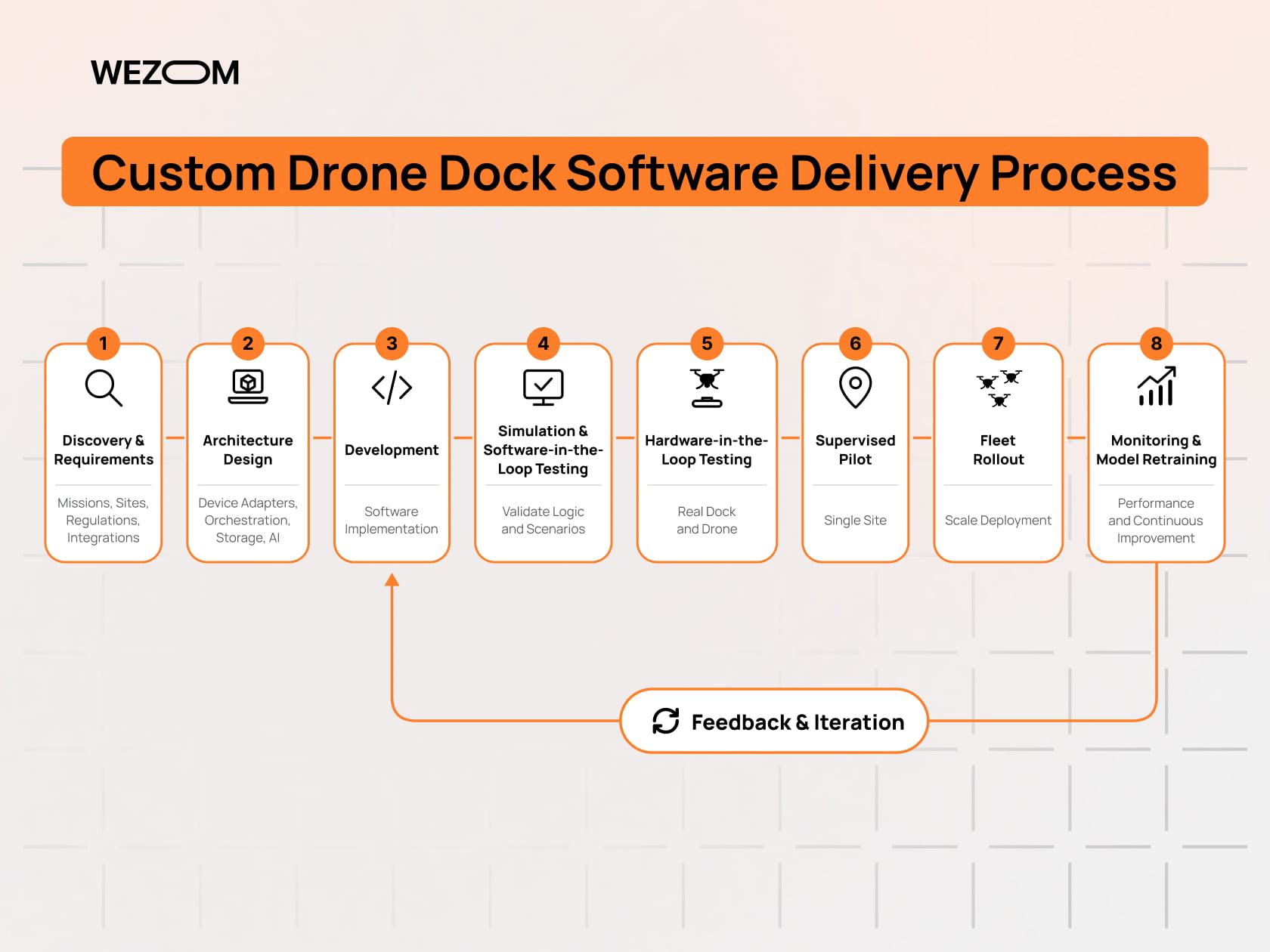
Software that controls aircraft needs more than standard QA. Simulation and software-in-the-loop testing validate mission logic and fail-safes, including link loss and dock faults, without risking hardware. Hardware-in-the-loop testing with a real dock follows, then a supervised single-site pilot before drone-in-a-box deployment across the fleet. Validation should cover event-mission latency, recovery from outages, and behavior after firmware updates.
How to Choose the Right Drone-in-a-Box System
Selection should start from the recurring operational need and site conditions, then move to hardware and software.
Evaluating drone dock compatibility, payloads, and flight endurance
Confirm which aircraft each dock supports and whether available payloads (zoom, thermal, LiDAR, multispectral) and accessories match the mission. Flight endurance and charging time determine coverage radius and missions per day.
Comparing proprietary and hardware-agnostic software solutions
Manufacturer platforms offer tight integration and fast setup but tie the organization to one vendor's roadmap and pricing. Hardware-agnostic platforms reduce lock-in, though integration depth varies by brand and new features may lag.
Assessing connectivity, deployment environment, and scalability
Check power, bandwidth and latency, physical security, mounting options, and maintenance access at each site. Confirm the platform handles many docks with template-based configuration, multiple user groups, and regional deployment.
Calculating total cost of ownership and operational ROI
TCO includes hardware, software subscriptions or development, installation, connectivity, spare batteries and parts, maintenance, insurance, regulatory approvals, training, and operator labor. ROI comes from measurable changes such as avoided truck rolls, fewer crewed inspections, faster alarm verification, and earlier defect detection, modeled against current costs at the specific sites.
Common implementation challenges and how to avoid them
Typical failures include underestimating connectivity, starting without approvals, collecting data no one reviews, and treating the dock as maintenance-free. Piloting one site with clear success metrics, securing approvals early, assigning owners for findings, and budgeting for maintenance before scaling avoid most of them.

FAQ
Can a drone-in-a-box system operate without a pilot physically present?
Yes. The system can launch, fly, land, and charge with nobody on site, but a remote pilot normally still supervises and remains accountable under aviation rules. Whether that pilot can fly beyond visual line of sight or supervise several docks depends on the operator's authorization, not the hardware.
What happens if a drone loses connectivity with its docking station?
The aircraft runs its preconfigured fail-safe, usually continuing and then returning, or returning immediately using onboard navigation. If precision landing is impossible, it may divert to an alternate dock or emergency site.
Can one drone use multiple docking stations during a mission?
Some platforms support taking off from one dock and landing at another, extending coverage along pipelines or power lines. This needs compatible docks, coordinated scheduling, and software that hands the aircraft between stations. Support varies by manufacturer and platform version.
How long can a drone-in-a-box system operate without maintenance?
There is no universal interval. Propellers, lenses, seals, batteries, and calibration need periodic attention, with frequency driven by flight volume, dust, salt, and temperature.
Can drone-in-a-box software support different drone manufacturers?
Vendor platforms usually support only their own hardware. Hardware-agnostic or custom platforms manage several brands through per-vendor adapters, though feature depth depends on what each manufacturer's API exposes.
What internet connection is required for remote drone operations?
Fixed sites usually use fiber or business broadband, while LTE/5G or satellite is common for remote and mobile docks. Stable upload bandwidth and low latency matter most for live video and control.
Can an existing enterprise drone be converted into a drone-in-a-box system?
Usually not. Docks are designed around specific aircraft dimensions, charging contacts, landing guidance, and firmware. Conversion requires custom hardware and software plus new safety validation, so buying a dock-compatible aircraft is normally more practical.
How much does custom drone-in-a-box software development cost?
Cost depends on the number of dock models supported, mission complexity, integrations with ERP, GIS, SCADA, or security systems, AI analytics, cloud or on-premises deployment, compliance requirements, and fleet size. A focused integration on a vendor API costs far less than a full hardware-agnostic platform, and a discovery phase is the most reliable way to get a realistic estimate.
